
Key takeaways
- Expense policy is still checked after payment in most companies, and AI moves that check to the moment a claim arrives.
- A claim passes through five stages, so an extraction error at the start becomes a coding error, a false flag, or a failed match later.
- Errors start in the data and the ERP mapping before they reach the model.
- Confidence scores per field and a reviewer queue keep miscategorized expenses out of the ledger.
- Agents resolve routine exceptions, and a person decides above set thresholds.
- Every claim needs a record of its inputs, model version, policy version, and approver, so an auditor can replay the decision.
- Teams should start with one pain, record a baseline, and widen the system’s authority only as audited samples support it.
Smart expense tracking offers relatively high cost savings among finance use cases. The gap between what AI can deliver and what companies have implemented is wide. Most expense processes still depend on staff retyping receipt data, and policy checks usually happen after payment.
Moving those steps ahead of payment is what AI expense management does. Models extract data from each receipt, code it to the right account, and check it against policy as the claim arrives; exceptions reach a reviewer before payment. What decides the outcome in production is the data behind the model, the integration with the ERP (Enterprise Resource Planning), and the handling of exceptions, topics that feature comparisons often skip. In this article, our AI consulting team covers AI for expense management: how it works, where enterprises use it, why projects stall, what to control, and how to implement it.
How AI for expense management works
AI expense management applies document models, language models, and policy logic to the full expense cycle: capture, coding, policy checks, approval and reimbursement, and reconciliation. Expense management is one of the finance tasks AI agents automate, alongside invoice processing, accruals, and financial close.
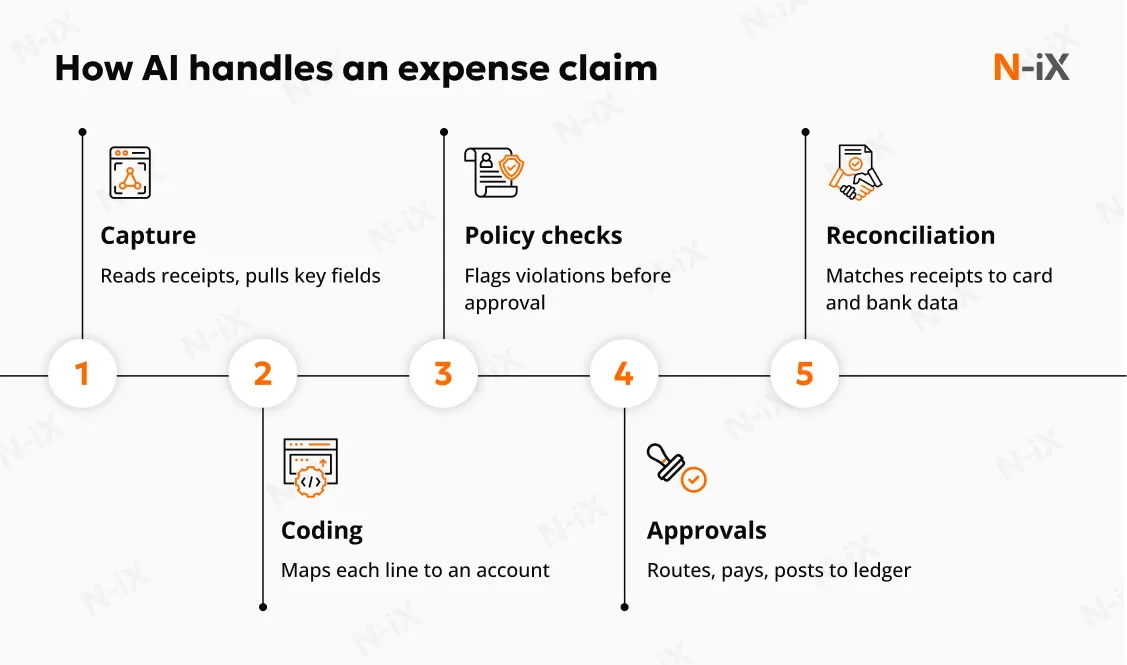
A claim passes through five stages, and each builds on the output of the one before:
- Capture and data extraction: The system reads each receipt, whether a photo, PDF, or email attachment, and pulls out merchant, date, amount, tax, and currency. Then document models handle layout, and language models resolve ambiguous fields.
- Categorization and general ledger (GL) coding: Once the data is extracted, the system maps each line item to an expense category, cost center, and ledger account. Models improve as reviewers correct them. Accuracy depends on a clean chart of accounts, because a model cannot code to an account defined twice.
- Policy checks: With the claim coded, rules run at submission or when a card transaction posts. The system tests amount limits, merchant types, per diem rates, and required receipts, and flags violations before approval. Policy that varies by region or role must be structured as logic. It should be done because a model checks only what is written down.
- Approvals and reimbursement: Claims that pass the checks are routed to approvers based on amount, role, and cost center, and low-risk claims can be approved automatically. Flagged claims go to a finance reviewer, who compares the receipt image with the extracted fields and approves, corrects, or rejects the claim. Approved claims move to payment and post to the ledger.
- Reconciliation: After payment, the system matches receipts to card and bank transactions and flags mismatches, missing receipts, and duplicates.
Standard automation flags an exception and stops. An AI agent resolves it: it requests a missing receipt, compares a claimed amount with the card record, and applies the relevant policy clause before approving or escalating.
Agents can also reverse the capture flow. The system starts from the card transaction and asks the cardholder for the missing receipt in a messaging app such as Slack or Microsoft Teams. Claims no longer wait for a submission.
N-iX saw the same shift in customer support at a regional bank. In our webinar with AWS, we described how the bank moved from predictive models to an agent that completes transactions. Support workload fell by 50%, and the AI agent became a primary customer channel.
The design lesson transfers to expense claims: the agent completes routine tasks and leaves judgment calls to people. For that reason, we recommend keeping a person in the loop above set thresholds.
6 common failure patterns in AI expense management systems
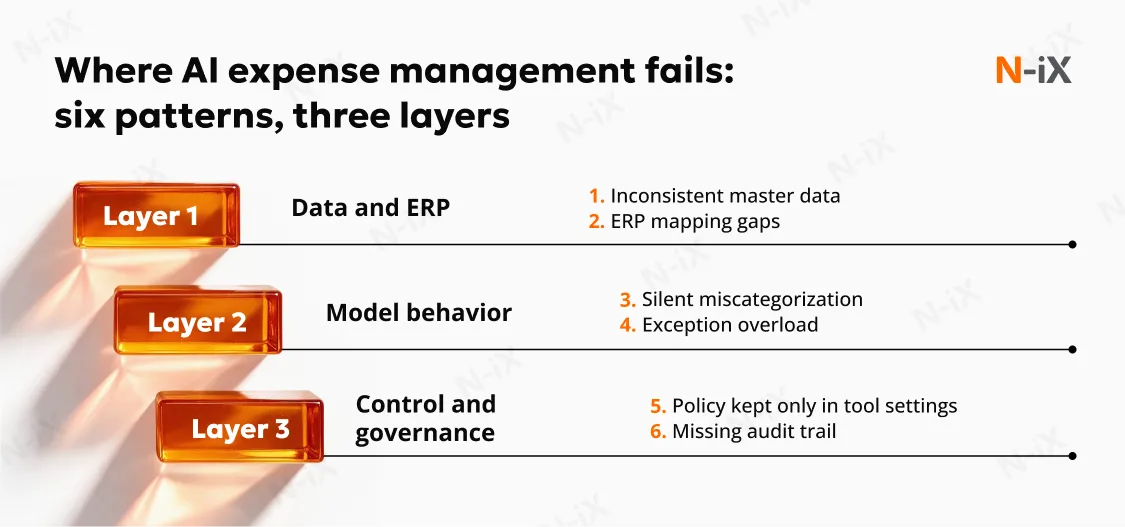
AI expense projects tend to fail at six points. The first two are in the data and ERP layers, the next two in model behavior, and the last two in control and governance.
Inconsistent master data
Employee, cost center, and vendor records often differ across HR, ERP, and card systems. The model then codes claims to the wrong account or routes them to the wrong approver. Teams should consolidate records into a single source of truth and assign data owners before rollout.
N-iX engineers saw what that layer looks like in an engagement with a North American transportation provider serving more than 900,000 passengers daily. Our team built a single source of truth across eight enterprise systems. It matches and deduplicates records and publishes golden records for employees, vehicles, locations, and certifications. The client decommissioned 19 core platforms in two years, cut maintenance costs by at least 30%, and now reviews revenue and expenses daily instead of at month-end. That engagement involved no expense AI, but it built the data foundation an expense model reads, under clear data governance.
ERP mapping gaps
Clean records still have to be posted to the ledger. Custom segments and legacy charts of accounts exceed what standard connectors can map, so postings get rejected, and finance corrects them by hand at close. Teams should map every account and entity during design and test the integration against closed periods.
Silent miscategorization
Once data and mappings are right, model behavior becomes the next risk. A model that returns a label without a confidence score gives reviewers nothing to check, so errors reach the ledger unseen. Systems should show confidence per field, send low-confidence items to a reviewer, and retrain on the corrections.
Exception overload
Confidence scores create a second risk: too many items reach reviewers. When every ambiguous claim goes to a person, the review queue grows and the time savings disappear. Teams should classify exception types, automate the known ones, and escalate the rest.
Policy kept only in tool settings
Beyond the model, the rules it enforces can fail. Real policy varies by region, role, and entity, and much of it lives in documents and habit. Tool settings capture only a fraction of it, leading to false flags and inconsistent approvals.
Missing audit trail
Every pattern above also depends on a record of what the system did. A system that logs the outcome but not the inputs, confidence, or approver leaves auditors unable to trace a decision. Every claim should carry its inputs, decision, confidence score, and approver.
If employee, cost center, and vendor records differ across systems, our team can assess data readiness before any model is selected.
Key use cases of AI expense management
The benefits of using artificial intelligence for business expenses show up in five places: receipt capture and OCR, policy compliance and audit, ERP integration, automated accounting and expenses, and corporate travel and entertainment.
Receipt capture and OCR: Less manual entry
Optical Character Recognition (OCR) converts receipt images into text, but raw text has no structure. Document models locate the merchant, date, total, tax, currency, and line items, and language models resolve ambiguous fields. Accuracy drops on blurred photos, faded thermal paper, handwriting, non-Latin scripts, and multi-page folios, which means results on a clean test set say little about production.
Degraded inputs like this are the norm in a production deployment, and our OCR consulting services are built around them. Where managed services handle handwriting, degraded scans, or complex multilingual layouts poorly, our team trains custom OCR models on the client’s own document corpus. We also build document-processing pipelines based on vision-language models that extract named fields and understand document context, and we add model monitoring and automated retraining so extraction accuracy holds at agreed levels after go-live.
Policy compliance and audit: Every claim checked before payment
With the data captured, policy checks can run on every claim at submission instead of sampling afterward. Running the checks in warn mode first, without blocking claims, lets a company compare the flags with reviewer decisions before enforcement, and each claim is judged against the rule in force on its expense date.
Expense management fraud detection with AI catches patterns that sampling misses, such as duplicate receipts, split transactions that avoid approval limits, and out-of-policy merchants. Because image tools now produce realistic receipts, it also checks file metadata and matches every receipt to a card or bank transaction.
AI expense management automation and accounting: Fewer open items at close
Accountants see the effect of AI-powered expense management in the ledger first: less time on corrections once postings flow reliably, and a shorter close because early flags and ongoing reconciliation clear items during the month. Early flags and ongoing reconciliation also shorten the close. The system continuously matches receipts to card and bank transactions, revealing mismatches and missing receipts during the month. It also suggests the expense category, cost center, and ledger account, and a reviewer confirms each suggestion. Claims submitted but awaiting approval can feed accruals from current data, which reduces estimates at close. The condition is a clean chart of accounts and consistent cost center records across the ERP and card systems.
Travel and multi-entity expenses: One process across countries
As a company adds countries and legal entities, rules multiply. Multi-currency amounts, per diem, and mileage follow country rules, policy variants apply by entity and role, and one pipeline reads receipts in different languages. For travel, the system can compare claims with booking data when a booking feed is connected, and for entertainment, it checks required fields such as attendees and business purpose against local limits.
ERP integration for enterprises: Postings that reach the ledger clean
Once a claim passes the checks, it reaches the ledger through the ERP system, so the integration decides how much of the benefit finance sees. Master data flows in from the ERP, including the chart of accounts, cost centers, legal entities, tax codes, and the approval hierarchy. Postings flow back with the coded expense, the tax treatment, and a link to the receipt image.
A production-grade integration needs an error queue with reason codes, a retry that cannot create a duplicate posting, and a named owner for the sync schedule. With that owner, a new cost center or a retired account reaches the expense system before the next claim is coded.
Key risks to control in AI-powered expense management
An expense system handles employee identities, card activity, travel patterns, and spend by cost center. Six areas decide whether that data, and the decisions made on it, stay under control. They are data location, access, explainability, fairness, stability when conditions change, and human oversight.
Data location and processing
Receipts and card feeds carry personal and payment data, so regional data protection rules and card industry standards may apply. Teams need to know where receipts are stored, where the models run, and whether a third-party model provider receives the receipt content. Deployment options range from vendor-hosted processing to a deployment inside the company’s own cloud account, and the right choice depends on residency rules for each legal entity.
Access and authentication
Access should follow the approval hierarchy: employees see their own claims, approvers see their teams, and finance sees data at entity level. Single sign-on ties access to the corporate directory, and departing employees lose access when their accounts close.
For a brokerage firm, our team built an internal generative AI portal with single sign-on through Microsoft Entra ID (formerly Azure Active Directory). Because the client operates in finance, it needed a custom solution inside its own security controls: authentication and authorization on every API request, the client’s internal identity and access management, data encryption, a VPN connection, and a network firewall. Our engineers also applied MLOps practices and compared language models and GPU options to reduce infrastructure cost. The portal supports employee tasks and internal knowledge, and the same control pattern applies to expense data.
Explainability
Every flag should show which rule fired and which fields drove it. A counterfactual statement turns a rejection into guidance: “This claim would have passed if the receipt had been attached.” Each claim record includes the inputs, extracted fields, confidence score, rule applied, decision, approver, and timestamp. Logging the model version and the policy version lets an auditor reproduce a decision made months earlier.
|
Field |
Example |
|
Claim ID and submitter |
EXP-2026-004217, employee 10482, entity DE01 |
|
Receipt |
Image link, retained under the local retention rule |
|
Extracted fields (confidence) |
Merchant: Hotel Example (0.98); date: 2026-10-14 (0.99); total: EUR 184.50 (0.97); currency: EUR (0.99) |
|
Coding suggestion |
Account 6410 lodging, cost center CC-2210 (0.94) |
|
Rules evaluated |
Lodging limit: pass; receipt present: pass; duplicate check: pass; approved merchant type: pass |
|
Decision |
Routed to approver, since the amount exceeds the auto-approval limit |
|
Approver and time |
Manager 20931, approved 2026-10-16 09:42 UTC |
|
Reviewer correction |
None |
|
Model and policy version |
extraction-2.3, coding-1.8, travel-policy v14 |
|
Submitted |
2026-10-15 08:03 UTC |
Fairness
Models read some receipts less accurately, such as non-Latin scripts and faded thermal paper. Those claims receive lower confidence and more flags, so employees in certain countries or roles can face more friction without having caused it. Teams can compare flag and rejection rates by region, role, and receipt language, and confirm that the training history includes flagged and rejected claims, not only approved ones.
Stability when conditions change
A new country, a policy update, or a seasonal travel peak shifts what the model sees. Teams can replay past peak periods against the current model and define retraining triggers, such as a rising dismissal rate or a drop in extraction confidence.
Human oversight
Thresholds define when a person decides: high amounts, new merchant categories, and policy exceptions. Agents work within defined permissions. An agent can request a missing receipt, but it cannot change a ledger account without approval. Model updates go through review and monitoring, because a retrained model can change coding behavior across thousands of claims at once.
|
Trigger |
Example rule |
Routed to |
|
Amount above limit |
Claim total above the approver’s limit, for example EUR 500 |
Line manager, then finance above a second limit |
|
New merchant category |
First claim in a category the employee or team has not used |
Finance reviewer |
|
Restricted merchant type |
Entertainment venues, gift cards, luxury retail |
Finance reviewer and compliance |
|
Missing receipt |
No receipt on a claim above a set floor, for example EUR 25 |
Employee request, then manager |
|
Low extraction confidence |
Total or date below the confidence threshold |
Reviewer, with the image beside the extracted fields |
|
Suspected duplicate |
Same amount, merchant, and date within a set window |
Finance reviewer |
|
Split pattern |
Several claims just under a limit from one merchant in one day |
Compliance |
|
Cash expense |
Any cash claim above a set limit, for example EUR 50 |
Manager and finance |
The model is one part of an expense system. The controls around it, meaning access, logging, thresholds, and review, decide whether the result is something an enterprise can rely on.

Fundamentals for implementing AI in expense management
Our approach to AI expense projects rests on four principles: pick one bottleneck, fix the data under it first, define success before the pilot starts, and widen the system’s authority only as audited results justify it.
- Start with the bottleneck that costs the most and has the cleanest data: We rank expense bottlenecks, such as late receipts, slow reimbursement, post-payment policy checks, and unmatched card lines at close, by cost and data readiness. Work begins where both are favorable, and the rest waits.
- Fix master data and ERP mapping before tuning the model: Poor cost center records and unmapped accounts produce rejected postings that no model improvement can fix. This work belongs in the project scope, with its own owner.
- Define success before the pilot starts: Three or four measures, such as days from submission to payment, unmatched items at close, and violations caught before payment, are agreed with the client, and the baseline is recorded. A pilot with no baseline cannot show a result.
- Widen authority only as audited evidence supports it: The system starts with flags and reviews, moves to auto-approval of low-risk claims, and expands the boundary after audited samples show an error rate comparable to manual review.
- The data work, the ERP integration, and the audit sampling are the parts that stall most often, and they need engineering and finance capacity at the same time. Enterprises that lack that capacity in-house often bring in a partner for it.
How N-iX helps enterprises with AI expense management
Results depend on the data, the ERP integration, and the controls around the model. Our teams build these layers for enterprises. We combine AI agent development for exception handling, data engineering for clean master data and reconciliation, and ERP solutions for integrations that reach the ledger. Report-iX , our natural-language reporting assistant, lets finance teams query spend data without writing SQL.
With 24 years in the market, 2,400 professionals, and 160 active clients, we work across finance, manufacturing, logistics, and retail.
If expense data sits in several systems, the ERP needs custom mapping, or compliance rules limit where receipts can be processed, our team can start with an assessment of data and ERP readiness and scope a pilot around one expense category.

FAQ
How does AI-powered expense management reduce processing time?
AI for expense management removes the manual steps that cause delays: retyping receipt data, coding to the ledger, checking policy, and matching card lines. Claims that pass every check can be approved without waiting in a queue, so reviewers handle only exceptions. Teams should measure days from submission to payment before and after a pilot, because the gain depends on data quality and approval thresholds.
How accurate is AI receipt scanning?
AI receipt scanning accuracy depends on image quality, language, and receipt layout, and results on clean test sets overstate production performance. Teams should measure field-level accuracy on a sample of their own receipts, split by language and receipt type. Each extracted field carries a confidence score, and low-confidence fields go to a reviewer.
How secure is AI in expense management for financial data?
Security in AI for expense management depends on where receipts are processed, who can access them, and what the system logs. Our team builds custom AI solutions inside the client’s own security controls, using measures such as single sign-on, data encryption, and network protection. Residency rules for each legal entity determine whether processing can run in a vendor environment or must stay in the company’s own cloud.
Can AI expense management integrate with an ERP system?
Yes, AI in expense management integrates with an ERP through connectors or APIs, with master data flowing in and postings flowing back. Standard connectors often cover only part of a custom chart of accounts or a multi-entity setup. In those cases, our team builds custom integrations and tests them against closed periods.
Can AI detect fake or AI-generated receipts?
AI can flag many altered or generated receipts by checking file metadata, editing traces, and mismatches with card and bank transactions, but no detector catches everything. Matching every receipt to a transaction is the most reliable control, and cash expenses or unmatched receipts should be subject to stricter review.
Have a question?
Speak to an expert