
Key takeaways
- Data annotation and labeling for AI models set the accuracy ceiling, and the model cannot learn beyond what the labels teach.
- Unclear guidelines create errors that retraining and new architectures cannot fix.
- More data repeats the same errors when the labels follow the same unclear rules.
- A trial round turns annotator disagreements into guideline fixes before thousands of items are labeled.
- High agreement shows consistency, and only a golden dataset shows correctness.
- Automation handles routine labels, and enterprise projects keep human review for hard cases and regulated decisions.
- Agents need step-level annotation, since a correct result can hide a flawed process.
Your team can keep changing the model architecture and still reach the same accuracy ceiling. Training data is a common reason, and data annotation for AI is where that data gets its meaning. It is the process of adding labels, such as categories, object outlines, or sentiment scores, to raw data so a model can learn from it.
When annotators apply labels differently, the model gets mixed signals. The same inconsistency reaches evaluation and any data analytics built on the labels, such as defect rates or sentiment trends. Labels need attention at the start of any AI development project, before the first item is labeled. Below, we explain why and how to set data annotation right.
Why is high-quality data annotation critical for AI model accuracy?
Data annotation for AI models directly influences their accuracy, because a model can only learn what its labels teach.
Many organizations recognize data readiness as a major challenge. In a Gartner survey, 63% of data management leaders said their organization either lacks the right data management practices for AI or is unsure it has them. Another reason for this comes from a Stanford Digital Economy Labs study. It found that only 6% had data fully ready for AI, and data quality and preparation delayed 21%.
Inconsistent annotation gives the model conflicting answers
Take a defect inspection model. One annotator outlines a hairline scratch as a defect, and another leaves the same scratch unmarked. The model sees one pattern with two answers. It flags some scratches and misses others, and the logic behind its decisions is hard to trace.
Unclear guidelines look like model weakness
When guidelines leave edge cases open, annotators fill the gaps with personal judgment. The model learns each person’s habits. Teams then change the architecture or retune parameters, but the cause is in the training data.
Flawed annotation distorts the accuracy score
The test set is annotated too. If it carries the same inconsistencies, the model is graded against unreliable reference labels. A high score may reflect agreement with flawed annotations, and the first real-world input exposes the gap.
More data repeats the same errors
Adding more labeled data raises accuracy only while the labels agree with each other and with the business rule. If annotators keep following the same unclear guideline, each new batch adds more examples of the same errors. The model learns those errors with more confidence.
Types of data annotation for AI models
Image and video annotation
Image and video annotation adds context about what appears in a frame and where. The techniques differ in how much detail they capture, and more detail means a higher cost per item. Video adds time. Annotators must also keep labels consistent from one frame to the next.
- Classification: One label for the whole image, such as “defective” or “acceptable.” It suits sorting and quality checks. It gets difficult at the borderline, where one person sees a minor scratch, and another sees a defect.
- Bounding boxes: A rectangle around each object, which lets a model find and count things. Two annotators rarely draw the same box. One hugs the object, the other leaves a margin, and they disagree on whether a half-hidden object deserves a box.
- Segmentation: The exact shape of an object, traced down to the pixel, for cases where the outline matters, such as measuring a lesion on a scan. Every extra pixel of precision gives annotators one more edge to place differently.
- Keypoints: Single points on joints or component corners, used for pose estimation and measurement. The hard part is the joint that is unclear or out of view.
- Object tracking: One object followed from frame to frame, which teaches the model how things move. If a car passes behind a truck and comes back, one annotator continues the track, and another starts a new one. If a car passes behind a truck and comes back, one annotator continues the track, and another starts a new one.
Text annotation
Text annotation tells a model what words mean in context. Human language carries intent, tone, and structure that a model cannot infer from raw text alone. Annotators supply that context by labeling whole documents, marking spans inside them, or linking one span to another.
- Classification: One label per message or document, such as topic, intent, or sentiment. Support teams use it to route tickets and monitor feedback, and messages that fit two categories or carry sarcasm produce most of the splits.
- Entity tagging: Names, dates, amounts, and products marked in the text. They are the basis of information extraction from documents. The disputes are small and constant. Some annotators include the title before a name, and others leave it out.
- Relationships: Links between entities, such as which party owes which obligation in a contract. They power contract review and knowledge graphs. They also raise a question that text rarely answers outright: whether a link is stated or only implied.
Audio and speech annotation
Audio annotation turns sound into structured data a model can learn from. A recording may include speech, background noise, multiple speakers, or machine sounds, and each needs its own label.
- Transcription: Speech converted to text with timestamps. It feeds speech recognition and call analysis. Transcripts diverge on unclear words and strong accents.
- Speaker labeling: A record of who spoke and when, which call analytics and meeting notes depend on. Overlapping speech and quick interjections such as “right” or “mm-hm” leave annotators unsure whose turn it is.
- Sound event tagging: Labels for non-speech sounds, such as an alarm or a machine fault, used in monitoring and safety systems. The open points are where an event starts and ends, and how to label two sounds that run at the same time.
Sensor, 3D, and time-series annotation
Sensor data comes from devices such as LiDAR scanners and equipment monitors. It is harder to read than a photo or a sentence, so annotators need domain knowledge as well as annotation skills. A generalist can outline a car. Recognizing a fault signature takes someone who knows the equipment.
- 3D cuboids: Boxes placed around objects in a LiDAR point cloud. They support navigation and obstacle detection. Points thin out with distance. The size of a faraway box is partly a guess, and annotators guess differently.
- Point cloud segmentation: A label for each point, such as road, building, or pedestrian, which helps a system understand a whole scene. Disagreements gather at the boundaries where one object meets another.
- Event labels on time-series data: An interval of a sensor stream marked as an event, such as a vibration pattern that signals an early bearing fault. Predictive maintenance models learn from these labels. Faults develop gradually, so even experts can place the start at different moments.
Which annotation type fits which data
|
Data |
Common annotation types |
Model decision it supports |
|
Images and video |
Classification, boxes, segmentation, keypoints, tracking |
Detect, count, measure, or follow objects |
|
Text |
Classification, entity tags, relationships |
Route, extract, summarize, or search |
|
Audio |
Transcripts, speaker labels, sound events |
Transcribe, identify speakers, detect events |
|
Sensor, 3D, time-series |
3D cuboids, point cloud segmentation, event labels |
Navigate, detect faults, predict failures |
|
Model outputs |
Rankings, ratings, flags, reference answers |
Align responses with quality criteria |
Step-by-step data annotation pipeline for AI projects
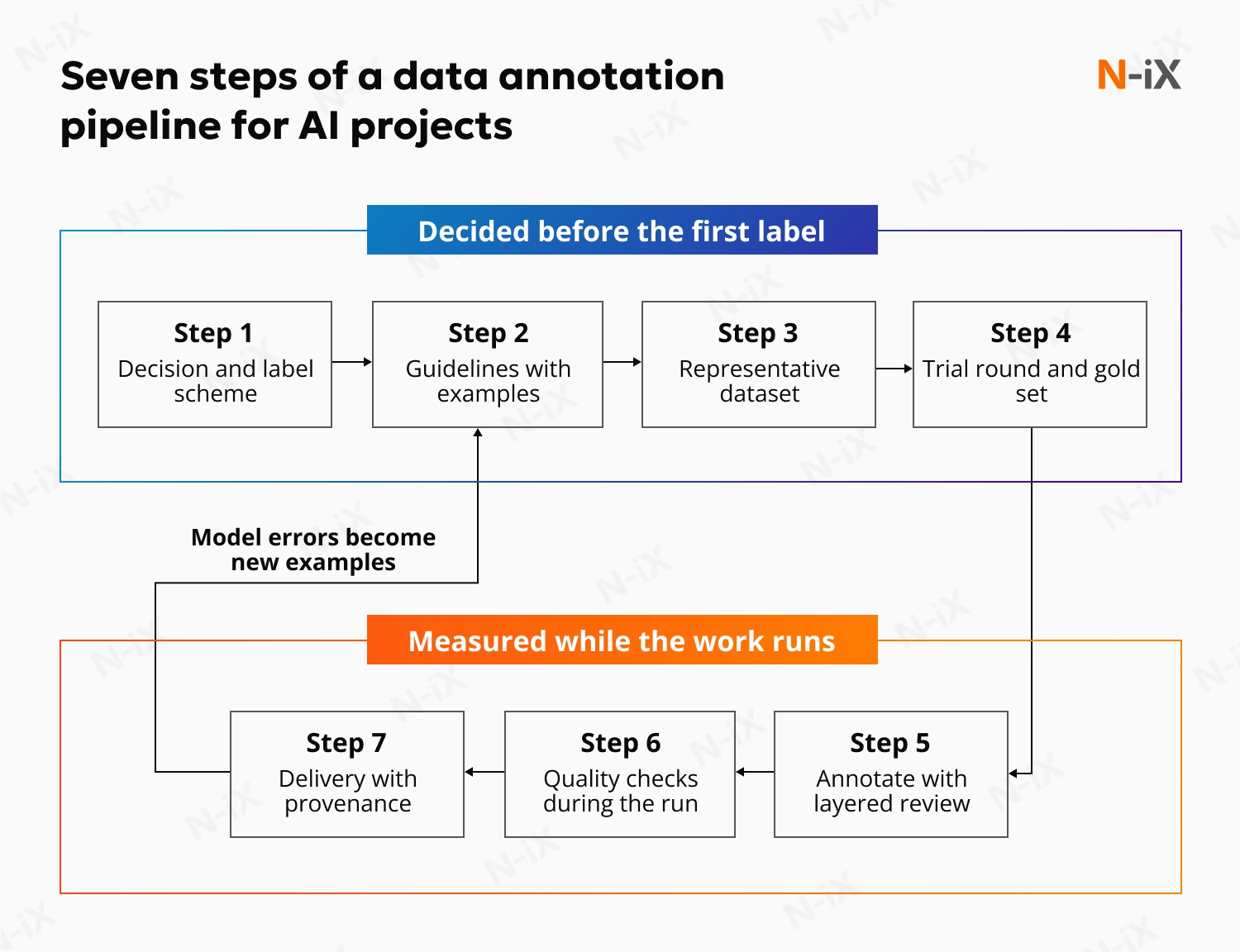
1. Define the decision and the label scheme
Start from the decision the model has to make, then work backward to the labels. A fraud model that must separate “review” from “block” needs labels that match those two actions. Teams sometimes reuse the taxonomy from an old reporting system. The resulting labels cannot support the model’s decision.
Three rules keep the scheme workable:
- Make categories separable. If two annotators cannot tell two labels apart from the definitions alone, merge the labels or write the rule that separates them.
- Add an “unclear” option. It gives annotators an honest place for items that don’t fit any predefined category, and its usage rate later shows where the guidelines have gaps.
- Match the detail to the decision. Boxes are enough for counting objects. Pixel masks are worth the cost only when the outline changes the model’s answer.
2. Write guidelines with examples
Guidelines are the single source of truth for every annotator. A usable set covers six things: why the data is being labeled and how the model will use it, a definition for every label, several examples per label, rules for edge cases, what to do when unsure, and a change log. The examples for each label should include a clear case, a near miss, and a wrong one.
Write edge-case rules as conditions. “If a ticket mentions both billing and cancellation, label it by the customer’s final request” prevents a dispute. “Use judgment” settles nothing.
Examples carry more weight than the length of the instructions. A Nature Machine Intelligence study tested labeling instructions for biomedical images. Adding example images improved annotation quality. Longer text descriptions did not.
Real data raises the edge cases early. On a computer vision project for Redflex, an intelligent traffic solutions company, N-iX started with annotation guides. They described how to label each windshield and driver behavior. The first data samples then showed what affects image quality: sun glare on the windshield, lack of lighting, and camera angles. A guideline has to cover those cases before annotation scales.
3. Prepare a representative dataset
Annotators can only label what they are given. A sample of clean, typical items teaches the model nothing about the cases that break it after launch. The easiest data to collect is usually the cleanest. At N-iX, we hold that AI-ready data must represent the use case, including every pattern, error, and outlier the model will encounter.
4. Run a pilot and build the golden dataset
Before the main annotation run, a small group of annotators labels the same batch of items independently. The disagreements are the useful output. Each one points to a gap in the guidelines. The guidelines change, and the annotators stay. A pilot that ends with retraining people and no guideline edits has missed its purpose.
Sort the disagreements by cause, because each cause has a different fix. When two labels cover the same cases, merge them or write the rule that separates them. A case the guidelines never mention becomes a new example with the agreed label. Poor input, such as a blurred image or noisy audio, cannot be labeled reliably. Add a “cannot judge” option or filter the item out. When one annotator reads a rule differently, calibrate with that person, then check whether others share the same reading.
Set the exit rule before the trial round starts. One example: agreement on each category reaches its target, and the last round adds no new type of edge case. Under deadline pressure, teams skip the trial round or end it early. The first sign of the gap then arrives weeks later, as a model accuracy plateau that no architecture change fixes.
The trial round also produces the golden dataset: items whose correct labels experts have agreed on. Insert golden items into the annotation stream without marking them. Annotators see them as normal work. Refresh the set whenever the guidelines change.
5. Annotate with layered review
Annotation works best with review built in, in layers that catch different errors:
- Automated checks catch structural errors, such as missing labels or values outside the allowed range.
- Peer review on a sample catches individual mistakes and drift.
- Expert review of hard cases settles items where annotators disagree. The decision becomes a new example in the guidelines.
Keep the roles separate, with no one reviewing their own work, and define send-back rules for items that fail review.
Two decisions shape the cost of this step:
- One annotator or several per item. Use overlapping annotation when labels are subjective, or errors are expensive, such as sentiment, intent, or medical findings. Use sampled review when labels are objective, and the volume is large.
- Pre-labeling or manual labeling. Pre-labeling by a model adds value when the model is already right on most items, because reviewers correct only the rest. When its suggestions are mostly wrong, correcting them takes longer than labeling from scratch. Reviewers also tend to accept pre-labels too readily. Keep spot checks on pre-labeled items.
Overlapping annotation is how we ran a text project for a threat intelligence client. Our data annotation teams labeled text fragments in batches of 200 to 1,000. Several annotators worked on the same fragments at the same time, and the team discussed the differences before the final version went to the model. The client had been dissatisfied with the accuracy of its models and needed more accurate training data. It extended our team after comparing our annotation quality with its previous vendor.
6. Measure quality while the work runs
Data annotation for AI models needs several quality signals, because a single aggregate score hides weak spots. Track several signals while the work runs:
- Accuracy on golden items, per annotator. It shows who is drifting or misunderstanding a rule. The fix is feedback, retraining, or reassignment.
- Agreement per category. A low score points to an unclear guideline. Rewrite the rule and add examples.
- Share of items sent back by reviewers. A high share signals a process issue. Raise the sampling rate and look for common causes.
- Rate of the “unclear” label. A rising rate shows gaps in the guidelines or poor input. Add rules or filter bad data.
- Time per item. Unusually fast work suggests rushing, and very slow work suggests a task that is too hard. Check the quality of the fastest items and consider splitting the task.
- Label distribution over time. A shift reveals drift in the data or in how annotators apply labels. Compare it with the golden set and update the guidelines.
Use chance-corrected agreement. Raw percent agreement looks high when one class dominates, because annotators agree by default. Cohen’s Kappa suits two annotators. Krippendorff’s Alpha handles several annotators and missing labels. Overlap measures such as intersection over union suit boxes and masks. Agreement alone cannot show whether the rules are right. Only golden set accuracy and model error analysis can.
7. Deliver with provenance and close the loop
The final dataset travels with a record of how it was made: the label schema, the guideline version, who labeled each item, which review it passed, the quality report from step 6, and known limitations. That record lets the model team trace a strange prediction back to the labels behind it. It also supports the data documentation that regulations such as the EU AI Act expect for high-risk systems.
The loop closes when model errors flow back into the pipeline. Cases where the model confidently disagrees with the annotation often turn out to be label errors, and those items deserve a second look first. Confirmed cases return to step 2 as new examples.
What is better: Manual vs automated data annotation for AI?
Neither wins on its own. Data annotation for AI training can be partially automated: a model or script proposes labels, which is enough for a small, low-risk dataset. Enterprise projects need manual review because a wrong label costs more, and automated labelers fail on the cases that matter most. The approach that works at scale combines both: automation proposes labels, and people verify them.
Where automated annotation works
Typical cases are small datasets for prototypes, internal tools, and short-lived experiments. Tagging a few thousand product photos by color for an internal catalog search is a good example.
Three conditions make automation safe:
- The task has one clear answer. Color, language, and file type qualify. Intent, sentiment, and medical findings do not.
- The labeling model is already accurate on this kind of data. A weak model creates more correction work than it saves.
- A wrong label has a low cost. No regulated or safety-related decision depends on the output.
Why enterprises keep manual review
Enterprise datasets feed decisions in finance, healthcare, manufacturing, and compliance. In a prototype, a mislabeled item costs a few minutes. In a fraud model or a diagnostic tool, the same item can cost a customer, a claim, or a regulatory finding. Models label routine items well, but they struggle with rare and ambiguous ones, and those are the cases a deployed model most needs to learn from. A model also repeats its mistakes. If it mislabels one kind of item, it mislabels every similar item, and the training set carries the error everywhere.
Human reviewers who check a sample of the output catch that pattern early. Review also leaves a record. Article 10 of the EU AI Act requires data governance practices for high-risk systems that cover annotation and labeling. A review log shows who checked which labels.
How to combine both
A workable design lets the model label first and sends people to the places where they add the most. The model pre-labels the data. Reviewers take the items where it is least confident, plus a sample of the confident ones. Golden items with known answers enter the workflow to measure the accuracy of the automated labels and the reviewers. Start with heavy sampling, reduce it as measured accuracy holds, and raise it again when the numbers drop.
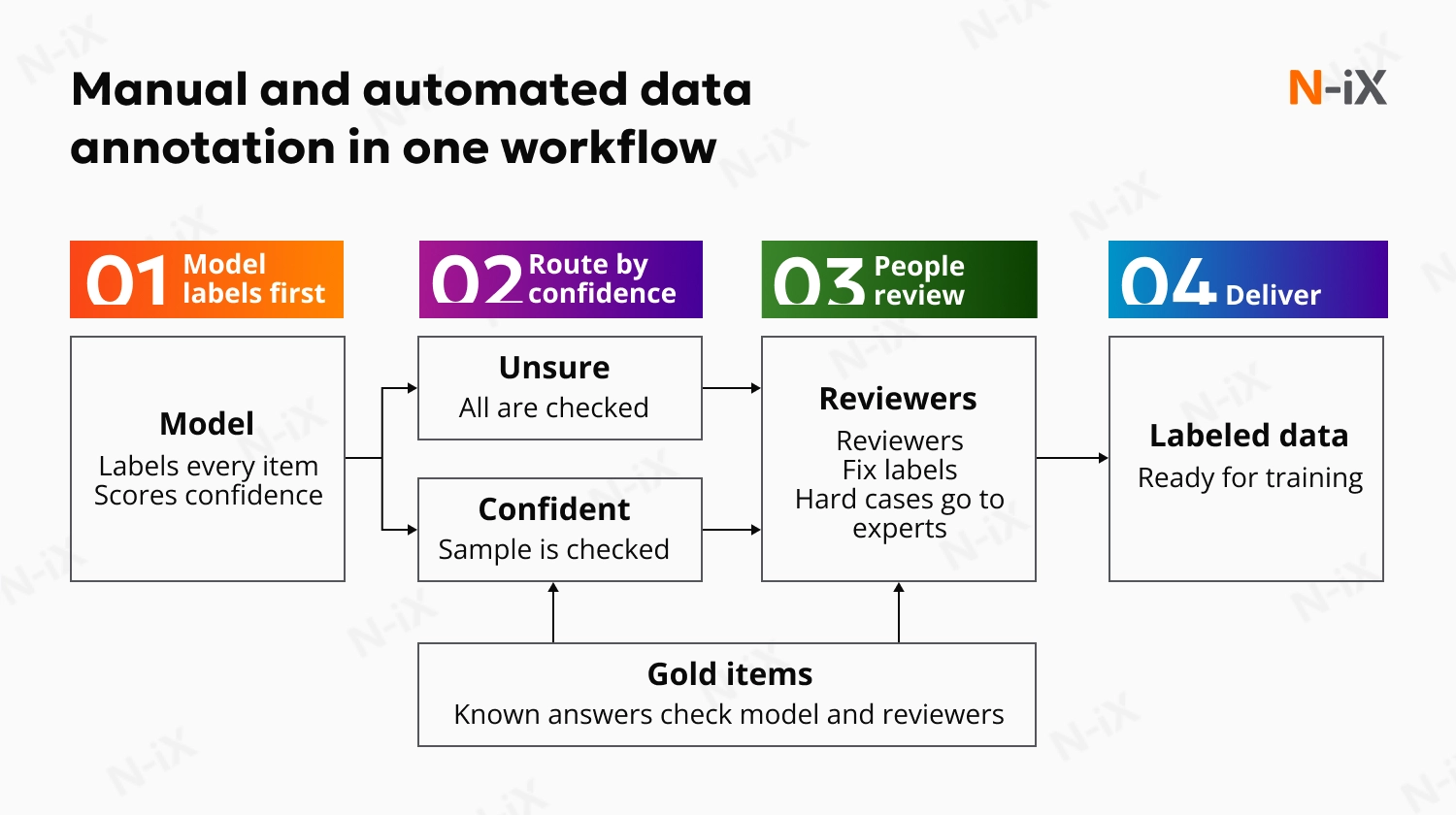
A simple rule decides the balance. Use automation alone when errors are cheap, and the task is clear. Add sampled review when volume is high, and the task is routine. Use human annotation and expert review when errors are costly, or the data supports regulated decisions.
Building this in-house takes an annotation tool, trained reviewers, and a maintained golden set. An expert company such as N-iX provides the full package: a custom annotation tool with automated pre-labeling, trained reviewers, and expert review of hard cases.

6 data annotation pitfalls in AI projects
Flawed data annotation for AI models can lead to wrong predictions and costly rework. Accuracy stalls, rework grows, and the cause traces back to a decision made in the first weeks. These are the six pitfalls we account for first when we plan an annotation project.
1. Skipping the trial round
A trial round looks optional until the main annotation run starts. We require it because it is the cheapest place to find overlapping labels or an edge case without a definition. Without it, those gaps surface when thousands of items are already labeled, and relabeling costs more than the trial would have.
2. Reading high agreement as high quality
A study by Computational Linguistics found that 52% of works with human annotators reported any agreement measure, and about 30% showed subpar quality management.
We read data annotation and labeling as a diagnostic. It shows that annotators apply a rule the same way. Annotators who follow an unclear rule agree with each other and are wrong together. For that reason, N-iX checks agreement against a golden set labeled by experts. We also discuss every disagreement until the team settles on one answer and records the reasoning.
3. Annotating only the data that is easy to collect
A model trained on easy data meets glare, noise, accents, rare categories, and unusual layouts for the first time after launch. In the first sample, we ask for rare classes, poor-quality input, and known error cases.
4. Paying for speed over accepted labels
In a vendor comparison of data annotation services for AI, price per label is the easiest number to compare, and it covers only part of the cost. Throughput targets reward fast work. Under that pressure, annotators skip the hard cases and pick the easiest label that fits, and the cost moves to rework, retraining, and model errors. We measure a project by labels that pass review, and we track time per item next to accuracy.
5. Changing the rules without versioning
Guidelines have to change as edge cases appear, and we expect that. A ruling made in week three changes how every later item is labeled. Without versioning, half the dataset follows the old definition and half follows the new one, and no one can tell which is which. We date every change and record the guideline version on each label.
6. Using generalists for expert work
Some labels depend on knowledge that no guideline can replace, such as a finding on a scan or a clause in a contract. We match annotators to the data by language and domain. Our data engineering teams also write the guidelines, resolve hard cases, and check a sample of the output.
If your team is planning an annotation project, or a model has stopped improving, and the data may be the reason, our AI and data specialists can review the setup with you, from guidelines and labels to quality checks.

What makes data annotation different for generative and agentic AI
In generative AI, annotators rate what a model writes, and no single label captures quality. A support answer can be accurate and too long, or short and incomplete. Teams define criteria such as accuracy, completeness, tone, safety, and groundedness, with an example for every score. Recording the reason behind each rating turns annotator disagreements into material for improving those criteria. A legal summary or a clinical answer needs an expert reviewer.
Data annotation for agentic AI adds a second task. Checking only the final result misses much of what can go wrong. Take an agent that handles a refund request. It looks up the order, skips the policy check, and issues the refund. The result looks right, but the process has a defect. Step-level annotation catches this by reviewing each step: the choice of tool and its arguments, the policy check before any action with side effects, and error recovery.
|
Classic annotation |
Generative AI |
Agentic AI |
|
|
What is annotated |
A raw item, such as an image, a text, or an audio clip |
A model response or a whole conversation |
A full trajectory of plans, tool calls, and results |
|
What the annotator does |
Applies a label |
Ranks, rates, corrects, or writes the ideal answer |
Judges each step and the outcome |
|
What defines quality |
A guideline with defined classes |
Written criteria with a scored scale |
Criteria plus rules for allowed and disallowed actions |
|
Typical disagreement |
Boundaries and edge cases |
Two good answers that differ in style or emphasis |
Whether a step was necessary or acceptable |
|
Main risk |
Inconsistent labels |
Reviewers who cannot verify the content |
A correct result reached by a flawed process |
Teams also use language models to score outputs at a volume people cannot match. These LLM judges carry biases, such as a tendency to favor longer answers. A set rated by experts shows how closely their scores match human ratings and when that agreement starts to weaken.
FAQ
What is data annotation for AI, and how does it work?
Data annotation for AI adds context to raw data, such as categories, outlines, entity tags, transcripts, or quality ratings. This context lets a model learn what the data represents. Annotators follow written guidelines, and reviewers check their work before the labeled dataset is used to train and test the model.
Can data labeling be automated?
Partly. A model can pre-label routine items accurately, and a human check of a sample is often enough for small, low-risk datasets. For enterprise data, people still review the hard and ambiguous cases, because a model repeats the same mistake on every similar item. Professional data annotation services for AI pair automated pre-labeling with that review.
How do you ensure data labeling quality for AI?
Quality comes from clear guidelines, a gold set of expert-labeled items, and measured agreement between annotators, checked together. In our projects, annotators label the same items independently, and the team discusses every difference before the final version goes to the model.
What is the difference between data annotation and data labeling?
Data labeling assigns a label to a data point, such as tagging a review as positive. Data annotation is the broader term and covers any context added to raw data, including labels. Many teams use the two terms interchangeably.
Have a question?
Speak to an expert