
 ChatGPT
 Perplexity
 Claude
 Gemini
 Grok
Grok
AWS holds 28% of the cloud market share and remains a leading hyperscaler in 2026, according to Statista. With a broad range of services, global reach, and strong AI/ML capabilities, AWS is a trusted cloud provider worldwide. Its vast ecosystem and support help businesses reduce costs, scale, and boost performance. However, organizations can face challenges when moving to AWS and may hesitate to migrate due to potential difficulties.
How can you address these challenges? And how can you prevent disruptions along the transition? We compiled the top AWS cloud migration best practices to help you prepare for a smooth transition.
15 AWS cloud migration best practices
The most common challenges organizations face when migrating to the AWS cloud include infrastructure incompatibility, downtime, complex cost management, and security issues. To address them, N-iX cloud experts share the top guidelines to follow across the pre-transition, transition, and post-transition phases. Let’s review AWS migration best practices:
Phase 1: Pre-migration
The success of moving to the cloud largely depends on preparation. It is crucial to develop a strategy, assess the environment, and prepare the organization for the cloud migration.
1. Define clear business goals
Align your cloud migration roadmap with your specific business objectives. They may include reducing costs, improving time-to-market, scaling, or enhancing operational flexibility. Then, set key performance indicators (KPIs) to track your migration progress and success. Defining and monitoring KPIs throughout the adoption process allows you to see real results and adjust the plan if needed.
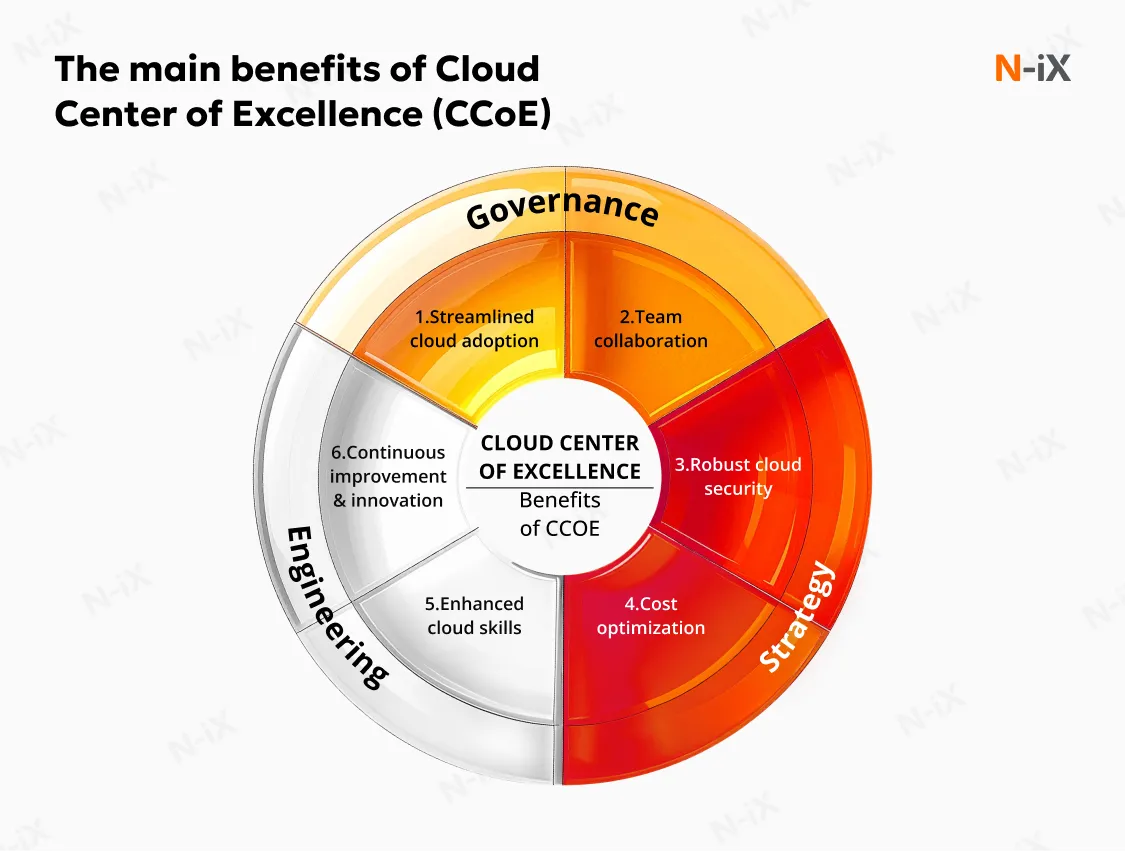
2. Establish a cloud center of excellence (CCoE)
A Cloud Center of Excellence should be established early to guide and govern the AWS migration. This cross-functional team typically includes senior experts from IT, security, operations, and business units. They define the adoption strategy, set engineering requirements, and take ownership of cloud governance. The last one is crucial to aligning with AWS cloud migration best practices.
3. Conduct comprehensive discovery and cost calculation
Before migrating, it is important to conduct a detailed assessment of your existing infrastructure. You can conduct a Well-Architected Review (WAR) to thoroughly measure and document your workloads using AWS tools and frameworks. Additionally, using AWS Application Discovery Service helps identify application dependencies, workloads, and data flows. These help prevent surprises during the migration. Calculating costs at this stage is also crucial. Our cloud experts advise using AWS Pricing Calculator and Cost Explorer to estimate the budget early in the migration process and avoid unexpected financial burdens.
N-iX always helps its clients during this phase to properly prepare for migration. For example, before moving to AWS with a global banking company, we performed a WAR to assess the infrastructure, identify risks, and optimize the cloud architecture for AWS. This detailed review helped align the migration strategy with business goals and ensured an efficient, cost-effective, and secure migration.
Read the full case: Faster data migration to the cloud with AWS Well-Architected Review
4. Select the right migration strategy
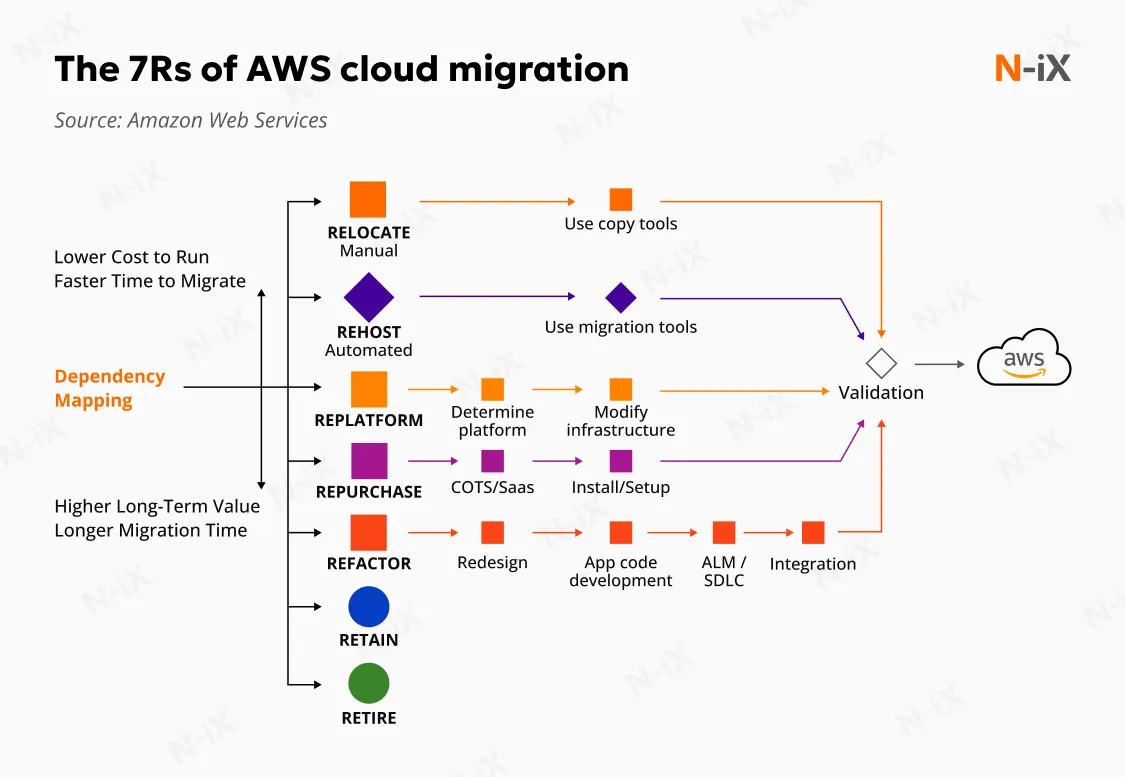
It is crucial to choose a migration approach that aligns with your infrastructure needs and business goals. The seven Rs of AWS application migration help guide your decision:
- Relocate: Move virtualized workloads directly to AWS without changing the application. This strategy is useful when maintaining the existing virtualization layer is important and supports quicker transitions.
- Rehost: Move applications to AWS without modifying code or architecture. This also supports quick migrations, reducing data center dependency.
- Replatform: Migrate applications while making minor optimizations to take advantage of cloud-managed services without rewriting the core architecture.
- Repurchase: Replace existing applications with a cloud-based or SaaS alternative rather than migrating the existing app. This is effective when a cloud-native solution provides equal or better capabilities.
- Refactor: Re-architect applications to fully leverage AWS cloud-native services. This involves redesigning or rewriting code to improve scalability, performance, and flexibility.
- Retire: Decommission applications that are no longer needed or do not add business value. Removing such workloads reduces operational complexity and cost.
- Retain: Keep applications in their current environment if migrating them now does not provide significant value, or if they have constraints such as compliance, latency, or unresolved dependencies. These workloads will be revisited later as part of future migration iterations.
5. Address skill gap
AWS migration often highlights skill and talent gaps in cloud architecture, security, automation, and operations. Closing them internally can take time and slow execution. To address skill shortage immediately, organizations partner with experienced AWS consultants. A certified partner, like N-iX, brings proven migration frameworks, deep cloud expertise, and knowledge of common challenges. Our AWS developers help companies reduce risk, accelerate delivery, and guide them through every phase of the migration process.

Phase 2: Migration
At this stage, the actual migration of data, applications, and infrastructure to AWS occurs. It is critical to minimize disruption and ensure the process goes smoothly, which is where following AWS cloud migration best practices can make a significant difference.
6. Adopt a phased approach
Migrating all workloads at once can be risky and complex. Instead, adopt a phased approach by starting with non-critical applications and gradually migrating more important systems. This approach minimizes downtime and enables you to address issues before they affect critical applications.
In practice, however, migration stages are not always clearly separated or formally structured. In these cases, N-iX experts develop Proof of Concepts (PoCs). For example, we followed this approach when helping a global financial leader migrate 90% of its infrastructure to AWS. We built a PoC to test different database migration methods before committing to a full migration. This allowed us to validate the performance and compatibility of the chosen approach in a controlled environment. By running these small-scale tests first, N‑iX ensured that the full migration would proceed smoothly and without unexpected challenges.
Read the full case here: Expanding financial services and gaining more scalability with AWS Cloud
7. Perform "dry runs"
A dry run is another way to test transitions and follow AWS migration best practices. It simulates the actual migration without affecting live systems. Before moving data to AWS, perform a trial migration to test your plan, configurations, and tools. This exercise helps identify any potential issues, such as performance bottlenecks, network misconfigurations, or data integrity problems, without the risk of disrupting your live systems. Dry runs also allow you to fine-tune processes and prepare your team for the real migration, increasing confidence and minimizing downtime during the actual migration.
8. Leverage automation and AI-driven tools
Automating migration tasks helps achieve a smoother deployment of resources. Infrastructure as code (IaC) tools like AWS CloudFormation and Terraform automate provisioning, accelerate migrations, and reduce human error. This allows cloud engineers to focus on more important tasks, such as application optimization and innovation.
AI-assisted tools can also support migration. For example, Amazon Q Developer helps teams analyze existing codebases to identify refactoring requirements and migration risks early. By highlighting dependencies, deprecated components, or compatibility issues, AI support shortens assessment cycles and reduces surprises during migration.
9. Utilize AWS-native migration tools
AWS offers many services that integrate seamlessly with this ecosystem, helping streamline migration. Here are some of the most common services for cost-effective transitions:
- Database Migration Service (DMS) facilitates seamless database transfers with minimal downtime. It also helps maintain security and compliance while moving data to AWS.
- Server Migration Service (SMS) helps automate the transition of on-premises servers to AWS, reducing the complexity and time required to move large-scale environments.
- DataSync enables efficient migration of large datasets between on-premises storage and AWS, reducing time and costs.
- Migration Hub provides a central location for tracking transition progress, enabling you to monitor and manage migrations across multiple applications.
10. Ensure data security in transit
Data needs to be protected during the migration using encryption protocols and secure transfer mechanisms, such as AWS Key Management Service, Secure Sockets Layer (SSL), and Transport Layer Security (TLS). Ensuring data protection in transit is a key part of AWS data migration best practices, as it helps maintain data integrity and safeguard sensitive information from potential breaches or compliance risks.
N-iX cloud experts followed this approach to protect the data migration of a major banking company. We implemented secure data transfer using AWS Direct Connect and KMS to safeguard sensitive financial information. Thus, we helped our client to ensure compliance with industry standards, minimize the risk of data breaches, and maintain continuity in banking operations.
Read the full case here: Robust data protection and disaster recovery in banking with migration to AWS
11. Develop a rollback strategy
Another key migration practice is implementing a solid rollback strategy. It is critical to ensure a quick recovery in case of an issue during the migration. You need to have a backup plan for all critical systems and data before starting the migration. If problems arise during the process, you need to be able to revert to the previous state without impacting your business operations. Regular backups and clear disaster recovery procedures help mitigate risks and protect your data.
Phase 3: Post-migration
The migration is not finished once your workloads are moved to AWS. It is crucial to continue optimizing the environment, reducing costs, and enhancing performance.
12. Modernize continuously
To fully leverage AWS cloud-native benefits, you should continue modernizing your applications. You can use Amazon RDS and Lambda tools for serverless computing or managed services, like database scaling. These tools reduce operational overhead and increase agility, allowing your organization to evolve with the cloud. One of the common AWS cloud migration best practices is to continue tracking KPIs and monitoring the success of the changes. This helps ensure that your modernization efforts align with your business goals, achieve desired outcomes, and provide long-term value.
13. Implement cloud-native monitoring
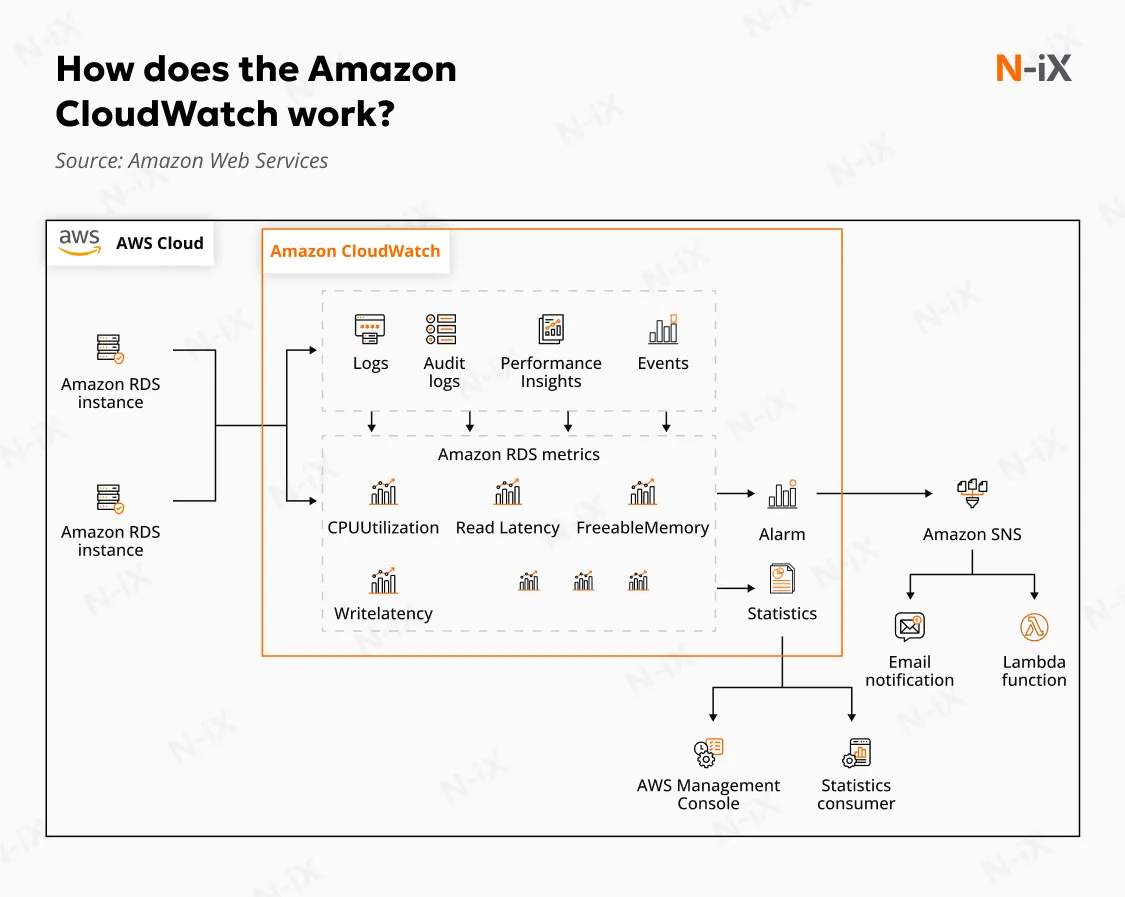
Once workloads are moved to AWS, traditional monitoring tools often fail to provide the visibility required to manage cloud environments effectively. Switch to AWS-native monitoring services, such as Amazon CloudWatch, AWS X-Ray, and AWS CloudTrail, for enhanced visibility into application performance and security. Tracking performance through these tools helps you identify issues early and optimize resource usage.
14. Optimize costs
Cloud costs can grow quickly if left unchecked. The AWS ecosystem also includes the Cost Explorer service, which helps monitor spending patterns and set alerts for potential overages. Constantly checking and eliminating unused resources significantly reduces the risk of unnecessary charges. Proactively managing costs helps keep the cloud environment efficient and cost-effective.
Cost visibility is very important before, during, and after migration. This is where FinOps comes in. Instead of tracking total spend alone, teams monitor unit costs, such as cost per transaction or cost per user. AWS Compute Optimizer service utilizes machine learning to recommend right-sizing actions for underutilized resources. Together, these practices help keep cloud spending predictable while the environment continues to change.
15. Establish ongoing security
Cloud security should be continuously monitored to maintain a safe environment. Implement cloud security best practices, including using AWS Security Hub to centralize security findings and cloud security monitoring to detect threats in real time.
In addition, AWS security increasingly relies on the Zero Trust approach. Each access decision is based on identity and context for every request. Services such as AWS Verified Access and IAM Roles Anywhere help ensure that all users and workloads are authenticated and authorized, regardless of where they operate. Combined with security audits and compliance checks, this approach helps maintain alignment with data protection and industry regulations.
The AWS three-phase framework for successful migration
Amazon offers its own migration framework. In 2026, it was also augmented by AI tools and services to automate and accelerate adoption. Let’s review AWS cloud migration best practices from the provider:
Phase 1: Assess
The assessment phase relies on automated discovery and data-driven analysis to build an accurate view of your current landscape. Key steps in this phase include:
- Inventory discovery: Use AWS Application Discovery Service to identify applications, servers, and dependencies across on-premises and cloud environments.
- Cost and TCO analysis: Estimate infrastructure costs using AWS Pricing Calculator and evaluate long-term efficiency, including sustainability metrics, with the AWS Customer Carbon Footprint Tool.
- Cloud readiness assessment: Utilize the AWS Cloud Adoption Readiness Tool (CART) to identify gaps in skills, operating models, and governance before migration begins.
- AI-assisted insights: Services such as AWS Migration Hub help apply analytics to consolidate discovery data and highlight dependency patterns, helping teams prioritize workloads and reduce manual analysis.
Phase 2: Mobilize
Before migrating workloads, the AWS environment must be production-ready. This phase focuses on establishing a secure and scalable foundation. Core elements include:
- Landing zone setup: Use AWS Control Tower to create a multi-account structure with built-in security, compliance, and networking guardrails.
- Cloud Center of Excellence (CCoE): Form a cross-functional team to define standards and create reusable Infrastructure as Code templates using tools such as Terraform or AWS CDK.
- Migration governance and automation: Standardize policies for identity, access, and cost control to ensure consistency across environments, as well as follow AWS data migration best practices for secure and compliant transfers.
- AI-supported preparation: Leverage automated analysis to define configuration gaps and readiness risks early with AWS Trusted Advisor, validating the environment before large-scale migration.
Phase 3: Migrate and modernize
The migration phase turns plans into execution and improves workloads for long-term efficiency. Key activities include:
- Wave-based migration execution: Migrate workloads in structured waves and track progress centrally using AWS Migration Hub.
- In-flight modernization: Adopt managed services and serverless components where they deliver clear value, reducing operational overhead.
- Automation-driven operations: Use Infrastructure as Code and CI/CD pipelines to deploy and validate environments consistently.
- AI-assisted optimization: Apply machine learning using AWS Compute Optimizer to recommend optimal instance sizing and resource configurations based on actual usage after migration.
- Continuous measurement and improvement: Monitor performance, cost, and reliability metrics to refine future migration waves and modernization decisions.
How can N-iX guide you through AWS migration?
The transition process may be challenging, and there are many practices you should follow before, during, and after migration. Partnering with an experienced cloud consultant can help you smooth your journey and have a professional team by your side. By following AWS cloud migration best practices, N‑iX offers a combination of technical expertise, strategic insight, and extensive experience in every cloud engagement.
N‑iX is a global cloud consultant with over 23 years of experience and more than 400 cloud engineers helping organizations navigate complex cloud initiatives. We officially partner with Amazon and hold AWS Premier Tier Services Partner status to help our clients leverage the full suite of their services. We also run Migration Acceleration Programs (MAP) to smooth the transition to AWS while minimizing operational risks.
Our team of 180+ Amazon-certified professionals can help you leverage deep expertise with a business‑focused mindset. Additionally, we always prioritize security in every cloud migration. By adhering to a range of protection standards, including PCI DSS, ISO 27001, ISO 9001, and GDPR, we ensure strong cybersecurity during transitions and beyond.
Contact N-iX to migrate and develop your cloud environment that scales with your initiatives.
Have a question?
Speak to an expert


