
Accounts payable teams still open invoices one at a time, read the amounts off the page, and key them into the system. Formats vary by supplier, volume grows with the business, and the work stays manual. AI invoice processing replaces the reading and keying with software that does both.
Finance functions have noticed. Gartner's survey of 183 CFOs and senior finance leaders found accounts payable automation to be the second most common AI use case in finance, adopted by 37% of the teams already using AI. Only knowledge management ranks higher, which puts invoices near the front of the queue.
Getting there involves more than picking a tool. Scoping the current process, often with AI consulting services, comes before any purchase decision. This guide covers how the technology works, where invoices break and what to do about it, five tools compared, the build or buy question, and the compliance rules behind both.
Executive summary
Invoices arrive in every format a supplier can produce, and someone has to read each one. AI handles that reading, and the decisions around it determine how much of the volume ever needs a person.
This article covers:
- What AI invoice processing does and how the three stages fit together;
- The four technologies behind it, and what each layer contributes;
- How exceptions work, where to set confidence thresholds, and how to bring the volume down;
- Five tools compared on what they suit and where they stop;
- When building fits and when buying fits;
- How to implement without disrupting month-end close;
- What GDPR and invoice record-keeping rules require.
What is AI invoice processing?
Invoice processing with AI reads incoming documents in any format, pulls out the fields that matter, checks them against purchase orders and receipts, assigns the accounting codes, and routes the invoice for approval. The work happens without a person retyping anything.
Older automation handled this with templates built per vendor, and each layout change broke the template. Current systems read unfamiliar layouts on the first pass and improve as they see more, which makes invoices a practical starting point for AI business process automation.
How AI-based invoice processing works
Every invoice follows the same path, regardless of format or sender. Three stages move it through the system, and anything the model reads with low confidence branches into exception review instead of continuing to the next stage.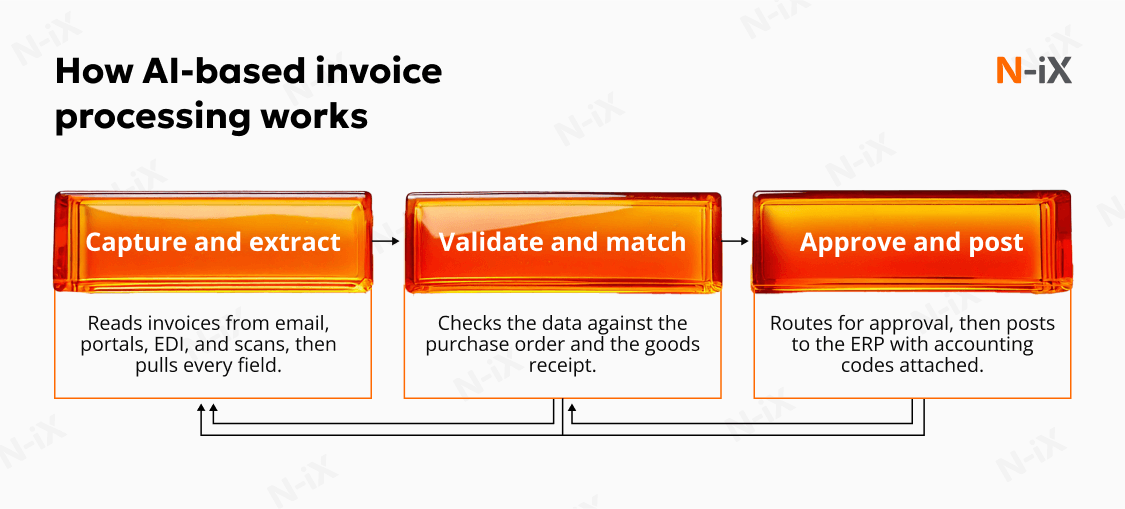
Capturing and extracting invoice data
Invoices arrive by email attachment, supplier portal, EDI feed, and scanned paper, and the system takes all of them. It reads each document and pulls the header and line-level fields: vendor, invoice number, date, PO reference, line items, tax, and total. Every field carries a confidence score that decides what happens next.
Validating and matching against purchase orders
Extracted data gets checked against the purchase order and the goods receipt, the three-way match that AI-based invoice processing is built around. Quantities, unit prices, and totals have to agree within the tolerances finance sets. The system also checks the vendor against the master record and flags anything it has already paid.
Routing for approval and posting to the ERP
Clean invoices route to the right approver based on amount, department, and budget owner, with reminders and escalation built into the rule set. Once approved, the invoice posts to the ERP with its accounting codes attached and enters the payment run. Anything held up stays visible instead of sitting in an inbox.
Key technologies behind an AI invoice processing system
Reading an invoice, understanding it, checking it, and acting on it are four separate jobs, and different technologies handle each one. They work in sequence, with each layer passing its output to the next, which is what separates reading a document from processing it.
Optical character recognition and where it stops
Optical character recognition (OCR) converts an image of a document into text a system can read. It handles scans, photographs, and PDFs, and returns characters with their position on the page. What it leaves out is meaning: which number is the total, which line is tax. Older systems closed that gap with per-vendor templates, and a layout change broke them.
Machine Learning for extraction and anomaly detection
Machine Learning (ML) models trained on historical invoices learn which field is which without being told where to look, and they score their own confidence on each one. The same models learn what normal looks like for each vendor, which lets them flag invoices that sit outside the pattern, such as:
- An amount well above anything that vendor has billed before;
- A duplicate submitted weeks later under a different invoice number;
- Bank details on the invoice that differ from the vendor master record;
- Line items missing from every open purchase order;
- An invoice dated outside the vendor's usual billing cycle.
Generative AI for document understanding
Reading documents relies on vision language models (VLMs), a type of generative AI that takes in the page image and its text together. Layout carries meaning, so these models read layouts they see for the first time, interpret free-text line descriptions, and work across languages without separate configuration.
The practical gain is that onboarding a new supplier needs little setup, and non-PO invoices stop being a separate manual queue. The caution with generative AI for invoice processing is that a model asked for a number will produce one, so every extracted value still gets validated against the source document before it moves.
AI agents for multi-step tasks
An agent goes past extraction and takes steps on its own. An invoice arriving with a purchase order reference that matches nothing in the ERP runs like this: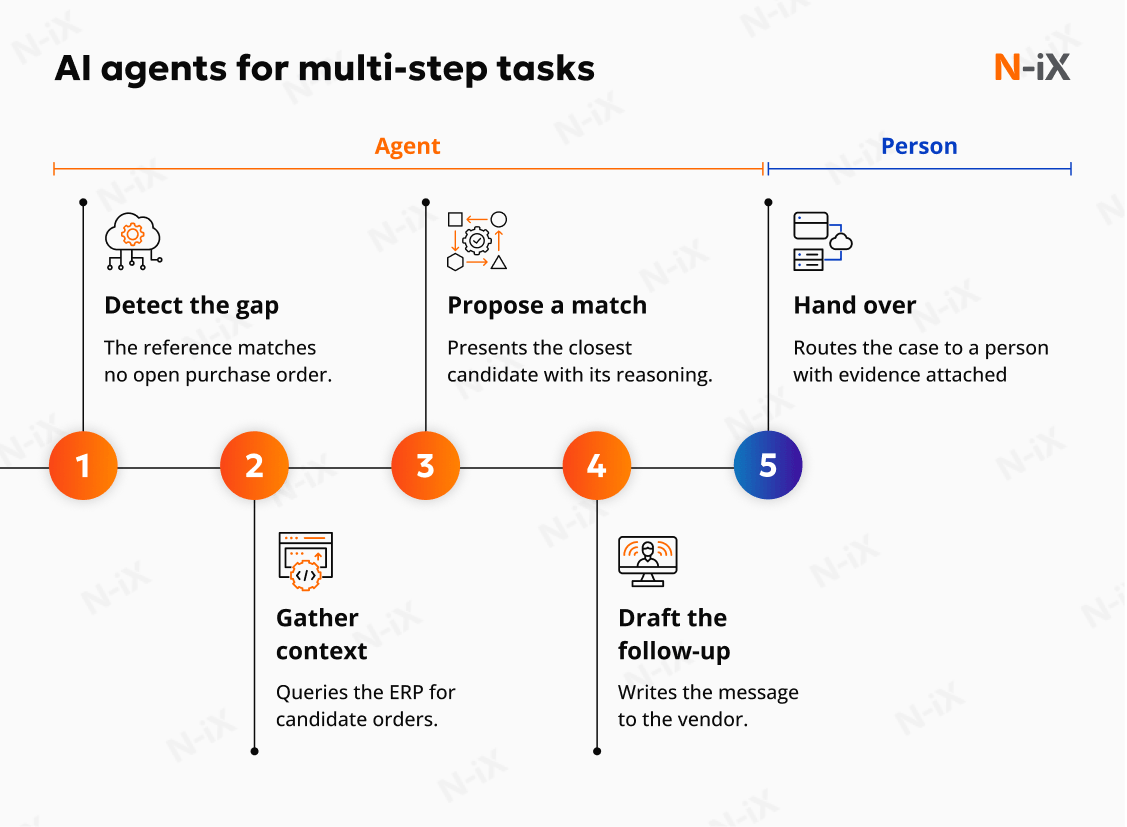
- Detects the gap: The reference on the invoice has no match against any open purchase order;
- Gathers context: Queries the ERP for open orders with the same vendor, similar amount, and overlapping dates;
- Proposes a match: Presents the closest candidate with the reasoning behind it;
- Drafts the follow-up: Writes the message asking the vendor to confirm the correct reference;
- Hands over: Routes the case to a person with the evidence already attached.
Each step is one a person would otherwise take. An invoice-processing AI agent runs them in sequence and stops when a decision needs authority.
Handling exceptions and edge cases
Exceptions are the invoices that stop in the flow: a mismatch against the purchase order, a reference leading nowhere, an unknown vendor. Some clear once an invoice processing AI agent gathers the missing context. What matters is where the line sits, which cases recur, and how the volume comes down.
Setting confidence thresholds
Every field the system extracts carries a score for how certain the model is. The threshold is the cut-off you set: above it, the invoice continues on its own; below it, it goes for review. Finance sets that number, and it belongs in policy alongside approval limits.
For example, a threshold at 95% sends a large share of invoices to review and lets few wrong values through. Dropping it to 85% cuts the review queue sharply and raises the chance something incorrect posts. Volume and invoice mix decide where the balance sits.
Common exception types
Exception volume looks unpredictable until you sort it. In practice, a handful of types account for most of the queue, and each one has a standard resolution path. These are the six that come up most often in accounts payable:
- Price or quantity mismatch. The invoice differs from the purchase order beyond the agreed tolerance, so it routes to the buyer who raised the order;
- Missing purchase order reference. The agent searches for a candidate match before anyone opens the case;
- Non-PO invoice. Utilities, subscriptions, and professional fees arrive with nothing to match against, so they route by cost center instead;
- Duplicate submission. The same invoice arrives twice under a different number, caught against payment history;
- Goods receipt outstanding. The invoice is correct and early, so it waits instead of routing to a person;
- Unknown vendor. No record in the master file, which needs a person for onboarding and bank detail verification.
Most AI invoice processing software handles the first four out of the box. The last two depend on how well you maintain your receiving process.
Reducing the exception rate over time
The exception rate is something you drive down. Resolved cases feed back as training data, and the rest of the work is upstream: cleaning up supplier records, loosening tolerances tighter than the business needs, and moving high-volume suppliers onto structured submission. Much of it sits closer to finance software development than to configuration.
AI invoice processing tools compared
The market splits three ways: platforms that replace the AP workflow, components that add document reading to the system you already run, and general AI platforms where you configure the workflow yourself. The five below cover all three, chosen for how often they appear on enterprise shortlists.
- Tipalti
- BILL
- Stampli
- ABBYY Vantage
- Zanus AI
Four things separate them in practice: the company size each is built for, whether it replaces your AP workflow or layers onto your ERP, how it handles purchase order matching, and how much engineering work deployment takes. The table below sets them against each other on that basis.
|
Tool |
Best for |
Worst for |
Features |
|
Tipalti |
Mid-market finance teams paying suppliers across many countries and currencies |
Low invoice volume and enterprises running deep SAP or Oracle procurement |
Supplier onboarding portal, tax form collection, PO matching, global payments, NetSuite and Sage Intacct integrations |
|
BILL |
Small and lower mid-market companies working in QuickBooks or Xero |
Three-way matching, multi-entity structures, heavy purchase order environments |
Approval workflows, payments network, accounting integrations, mobile approvals, AR alongside AP |
|
Stampli |
Approval-heavy processes and teams wanting deployment without changing the ERP |
Full procurement lifecycle and cases where payment breadth is the main requirement |
AI assistant for coding and routing, comments held against each invoice, ERP-agnostic deployment, payments as an added module |
|
ABBYY Vantage |
Enterprises keeping AP inside SAP or Oracle and adding document reading to it |
Teams expecting a finished AP workflow out of the box |
Pretrained invoice skills, coverage across document types, on-premises or cloud deployment, APIs for ERP and RPA integration |
|
Zanus AI |
Organizations whose data residency rules exclude cloud AP tools, and teams willing to configure the workflow themselves |
Teams wanting AP-specific capability on day one, such as three-way matching, supplier portals, or tax handling |
Private knowledge base built from company documents, job-based workflows with permissions and decision history, on-premises deployment, automated task execution and reporting |
Build vs buy: Which approach fits
Both routes lead to working AI invoice processing automation. The difference is what you own afterward and how far the system bends to your process. The answer turns on invoice variety, the number of entities and ERPs involved, and whether AP is a differentiator or a back-office function.
When to build
Building means the workflow matches your process, not the other way around, and the data stays inside your systems. The limit is capacity. A McKinsey survey found that finance teams are held back by heavy workloads, missing skills, and thin resources more than by technology or data itself.
Building fits a few specific situations:
- Invoice volume is high enough that per-document vendor fees outweigh the engineering effort;
- Approval rules, entity structure, or matching logic sit outside what the products support;
- The extracted data feeds other systems, so the extraction layer belongs to you;
- Regulation or client contracts keep documents inside your own infrastructure;
- Engineering capacity already exists to own the system after go-live.

When to buy
Buying gets a working system running in weeks, with the vendor maintaining extraction models, tax rules, and integrations. The trade is that your process bends to the product, and the fees continue for as long as you use it, which is worth modeling against your wider AI spend.
Buying fits a different set of situations:
- Invoices are standard, and volume sits inside a vendor's normal range;
- The ERP is one of the mainstream platforms these tools already integrate with;
- AP runs as a back-office function with little strategic weight;
- Internal engineering is committed elsewhere and will stay that way;
- Something has to be live this quarter, and the process can adapt to the tool.
How to implement AI invoice processing automation
Implementation runs narrow before it runs wide. One invoice type proves the pipeline, integration with the ERP takes the bulk of the calendar, and the rollout gets timed around the close. Here is how to run that sequence while invoices keep moving.
Starting with one invoice type
Begin with high-volume, standard purchase order invoices, where formats are predictable, and matching is clean. Running one stream proves the extraction and matching logic, sets the confidence threshold, and tests exception routing before multi-page documents, scanned paper, and non-PO expenses enter the pipeline. Corrections from this stream become the training data for everything that follows.
Integrating with your ERP and supplier records
Connecting to the ERP takes the bulk of the calendar. The system needs read access to supplier records, open purchase orders, and goods receipts to run three-way matching, plus permission to post approved invoices back. Keeping that data in sync prevents duplicate suppliers and mismatched accounting codes.
Three tips can help you build this connection efficiently:
- Use APIs where the ERP supports them, since batch transfers delay matching by a cycle;
- Map extracted fields to the ERP schema once, and keep that mapping in version control;
- Post approved invoices through a staging step before they reach the general ledger.
Rolling out without disrupting month-end close
Timing decides whether an AI invoice processing rollout helps or gets in the way. Go live in the days right after a close, so the team has the longest possible run before the next deadline. Keep the automated flow and the manual checks running side by side for one full cycle, and switch over once the numbers agree.
Planning for the common challenges
Even well-planned implementations encounter operational friction during rollout. Anticipating common hurdles allows teams to mitigate bottlenecks proactively without delaying the core deployment schedule.
Three things account for most of the friction during rollout, and each is easier to handle before go-live than after:
-
Messy supplier records
Duplicates and outdated entries trigger false exceptions. Clean them before go-live and set rules for onboarding new suppliers.
-
Trust in the system
Reviewers may doubt the suggestions or fear for their jobs. Bring them in early, with automation framed as the end of manual data entry.
-
Low-quality submissions
Faded scans and image-only PDFs push extraction scores down. Move high-volume suppliers onto structured submission.
Compliance and audit requirements
Invoices sit under two sets of rules at once. They hold personal data, which brings data protection law into scope, and they are tax records, which carry requirements on how long they are kept and in what condition. Both apply from the day the system goes live.
GDPR counts anything identifying a person as personal data, and invoices hold plenty: contact names, sole trader details, bank accounts. That means a lawful basis, a set retention period, and restricted access. AI invoice processing adds one more question: whether pages leave your region to reach a hosted model, and whether the vendor agreement covers that transfer.
Audit trails and record-keeping
The EU VAT Directive requires every invoice to stay authentic, unaltered, and legible until the end of the retention period each member state sets, with business controls creating a reliable audit trail back to the supply. Practically, hold the original document untouched, log the source page, confidence score, approval, and any override, and keep the archive readable in an open format. US-listed companies test these controls annually under Sarbanes-Oxley.
AI invoice processing with N-iX
N-iX runs this work through APEX: assess the current invoice flow and where it breaks, pilot on one invoice type, expand across entities and invoice categories, and exceed the baseline the pilot set. With 24 years in software engineering, our teams handle the extraction models, the ERP integration, and the exception logic behind them.
The decisions that matter come early. Where the confidence threshold sits, which exceptions get automated and which need a person, whether the capability is bought or built, and how the rollout is timed around the close. Each one shapes how much of the volume ever runs untouched.
Nothing here is a technology limit. The models read invoices well enough today, and the work that decides the outcome sits in supplier records, matching rules, and the thresholds finance owns. Teams that treat those as the project, and the software as one part of it, get the rate they planned for.
FAQ
What is the difference between AI invoice processing and invoice automation?
Invoice automation covers the workflow: routing for approval, sending reminders, posting to the ledger, and scheduling payment. Those steps run on rules somebody configured. AI handles the part before that, reading the document and working out what each field means. A working system needs both, since rules can only act on data the system has already understood.
Can AI process handwritten or low-quality invoices?
Yes, though accuracy drops. Printed text on a clean scan reads reliably. Handwriting, faded thermal paper, and photographs taken at an angle produce lower confidence scores, which send those invoices to human review instead of through the automated path. The practical answer is to move suppliers onto email or portal submission.
Can invoice processing handle multiple currencies and tax rules?
Currency is handled well. The system reads the currency on the document, applies the rate your policy specifies, and posts in both transaction and reporting currency. Tax is harder, since VAT, GST, and reverse charge rules vary by country. Tax determination belongs in the ERP, with the model supplying the values it reads.
How long does it take to implement invoice processing with AI?
Timelines vary with invoice volume, ERP complexity, and how many exception types you take on first. As rough guidance, a pilot on one invoice type runs six to eight weeks, main volume reaches production in three to six months, and full rollout lands somewhere between six and twelve. Scope each against your own systems.
Does an invoice processing AI agent replace the accounts payable team?
It takes the clean invoices off the queue, which is where most of the hours go. What stays is the work that benefits from judgment: disputed amounts, vendor relationships, controls, and anything that looks like fraud. Teams that automate well tend to hold headcount steady while volume grows, instead of cutting the function.
Have a question?
Speak to an expert