
Key takeaways
- Savings come from the router, and control comes from the gateway.
- Each routing type covers a limit of the previous one, from rules to answer checks.
- The right setup depends on what a wrong answer costs in each workload.
- Without an evaluation set, a router hides failures behind lower bills.
- A fair test compares the router with the best single mid-tier model.
- Routing rules need a quarterly review as prices and models change.
The default AI setup sends every request to one frontier model. It is the simplest setup to build and maintain. Then usage grows. Agents call the model several times per task, and the monthly invoice grows faster than the number of users.
Yet most of those requests are routine. A refund policy lookup and a review of a 40-page contract need different models at very different prices. AI model routing sends each request to the cheapest model that answers it well. The routing logic sits between your product and the models, and setting it up is a common task in AI consulting projects. This guide helps you decide which requests deserve your most expensive model.
What is AI model routing?
AI model routing is a decision layer between your application and a pool of large language models (LLMs). The router reads each prompt and checks its complexity, latency budget, and data rules. It then picks the cheapest model in the pool that meets them. Simple requests go to small, cheap models. Complex requests go to frontier models.
Most teams start with static routing: each feature calls one fixed model, set in the code. Dynamic model routing chooses the model for each request at runtime, based on the prompt and its context. All four routing types described below are dynamic.
The user sees one assistant. Behind it, an HR chatbot might answer a vacation-policy question with a small model in under a second and send a request to compare benefit plans across three countries to a frontier model. Both answers come through the same API endpoint, at very different costs.
Routing works at two levels. At the request level, the router picks a model for each prompt. At the task level, an orchestrator splits an agent’s task into steps and assigns each step to a model or a specialized sub-agent. Data rules apply at both levels. Sensitive or high-volume requests can stay on self-hosted small language models (SLMs).
AI router vs AI gateway
A gateway is an access layer, whereas a router is a decision layer. Cost savings come from the routing logic. Control and visibility over model use come from the gateway. Some products combine both layers: an AI gateway with intelligent model routing checks access and picks a model in one call. Even then, set a separate goal for each layer and measure each one on its own.
|
AI gateway |
AI model router |
|
|
Main job |
Controls access to models |
Chooses a model for each request |
|
Decision it makes |
Who can call which model, and how often |
Which model answers this prompt |
|
Typical features |
One API for many providers, authentication, rate limits, logging, failover |
Prompt scoring, model selection, escalation rules |
|
Position in the stack |
Between applications and model providers |
Usually behind the gateway |
Why one model for every request stops working at scale
A single frontier model is a reasonable starting point. It removes one variable during testing, and answer quality stays high. The setup becomes inefficient once volume grows. Unlike training, inference costs grow with every request, and leaders already see it in their budgets. According to Accenture, 69% of leaders scrutinize AI operating costs more closely than in 2025. 41% actively manage AI token economics, and another 51% have started to track it.
Price gap between model tiers
Small and mid-tier models cost a fraction of frontier models per million tokens, and the gap keeps growing. Over the 12 months to October 2026, frontier token prices rose 66.7%. Mid-tier prices fell 44.5% over the same period. Every routine request sent to a frontier model pays for capability it never uses.
Model calls in agent workflows
One user task can trigger a plan, several tool calls, data extraction, and a final summary. Each step is a separate model call. The share of large US companies building multi-agent systems grew from 6% to 25% in one quarter, according to KPMG.
Read more about how to control agent token usage
Dependence on one provider
Outages, rate limits, and model retirements can affect every feature at once. An AI model routing layer can move traffic to a backup model and keep the product running.
Data rules for each request
Some requests contain personal or regulated data and must stay on approved models in a specific region. A single global endpoint applies one rule to all of them. That rule must cover the most sensitive request, and every routine question pays the same price. LLM model routing cost optimization works inside these parameters: the router applies the data rules first and then picks the cheapest approved model for each request.
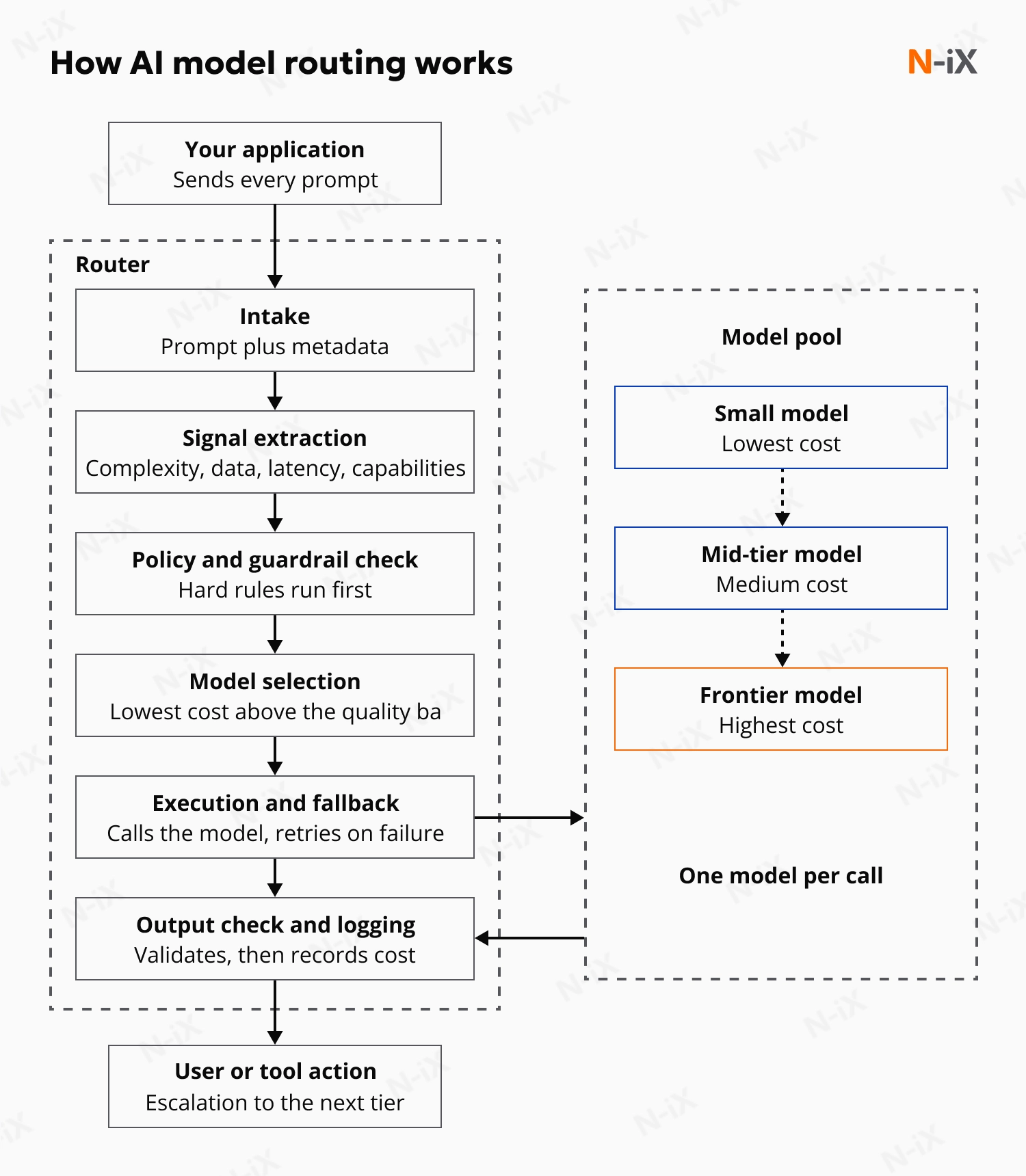
How LLM routing works: The path of one request
A router adds one decision step between your application and the models. The application sends every prompt to a single router endpoint, and the router chooses the model. Here is what happens to a single request.
- Intake. The prompt arrives at the router with its metadata: user, product, session, and any attached documents.
- Signal extraction. The router reads four groups of signals:
- Task complexity: simple extraction or lookup, or multi-step reasoning and code review.
- Data sensitivity: personal data, regulated content, or residency rules.
- Latency budget: a real-time chat reply, or a batch job that can wait.
- Required capabilities: tool calls, document retrieval, vision, or text-to-SQL.
- Policy and guardrail check. Hard rules run first. The router filters prompt injection attempts, redacts personal data where needed, and checks the request against the team’s token budget. Requests with sensitive data go only to approved models in the right region.
- Model selection. Among the models that pass the policy check, the routing logic picks the one expected to meet the quality bar at the lowest cost. Depending on the routing type, this is a rule, an embedding match, a classifier score, or a confidence threshold.
- Execution and fallback. The router calls the selected model. On an error, a timeout, a rate limit, or a low-confidence answer, it retries on a backup model or escalates to the next tier.
- Output check and logging. The router checks the answer against format and policy rules before it reaches the user or triggers a tool action. It then records which model answered, the cost, the latency, and a quality signal.
How AI model routing optimizes cost
AI model routing cost optimization lowers spend through five levers. Each one moves a type of work to a cheaper model or a cheaper processing method. Small models return the first token faster. Simple questions get quicker answers.
Routine tasks go to cheaper models
A large share of enterprise traffic is routine: entity extraction, intent classification, short answers, formatting. These tasks rarely need frontier-level reasoning. A router sends them to small or mid-tier models and keeps the frontier model for multi-step reasoning, complex analysis, and high-stakes answers.
The effect grows with output length: at OpenAI, for example, output tokens cost several times more than input tokens, which makes long answers the most expensive part of a frontier-model request. Routine tasks with long outputs, such as summaries and reports, offer the biggest savings per request when you move them to a cheaper model.
Agent steps go to the model each step needs
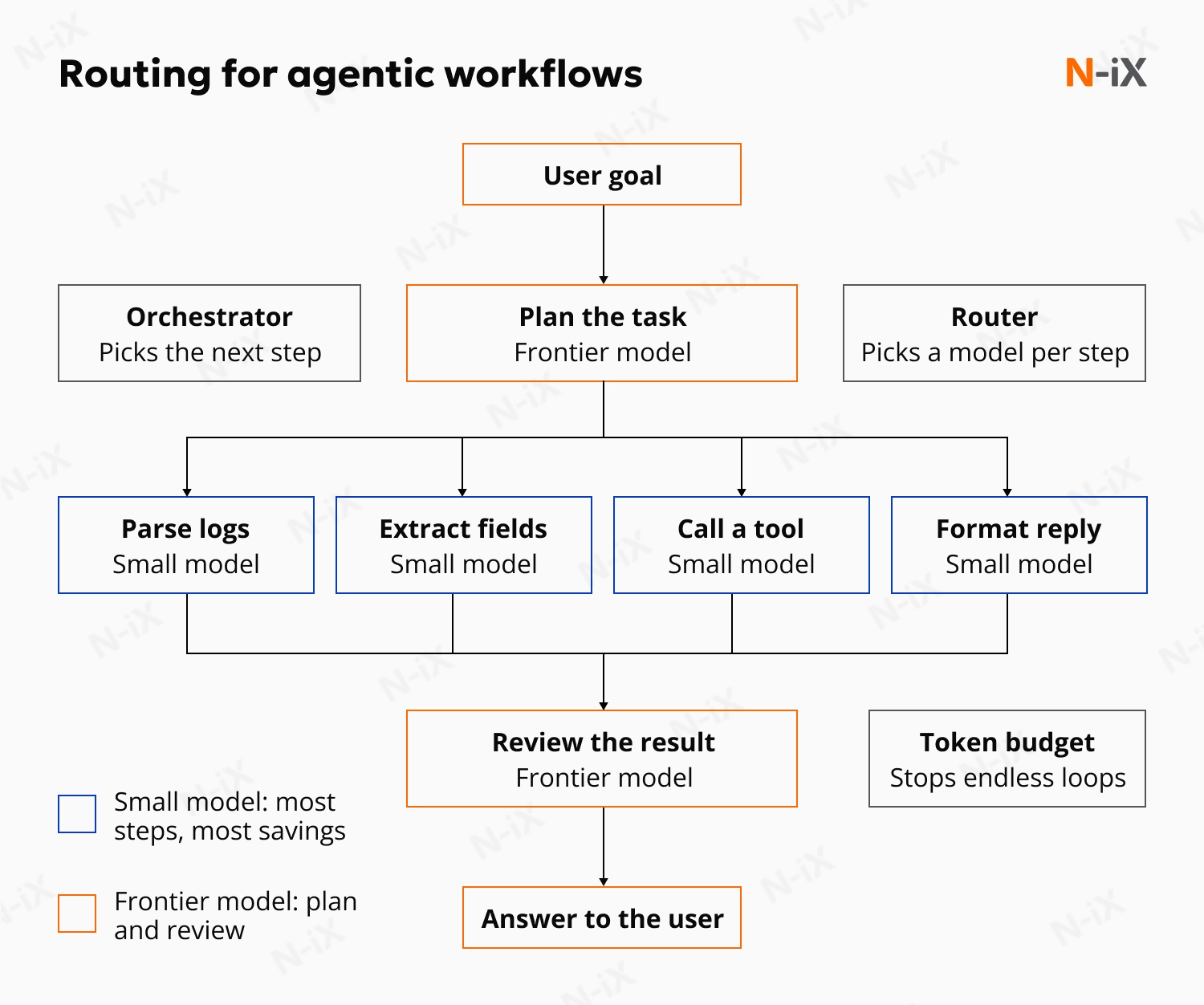
One agent task contains steps with very different demands. Planning the task needs strong reasoning. Parsing a log file, extracting fields from a document, or formatting the final reply runs well on a small model. Routing each step by task type keeps the frontier model’s token share small, while preserving final-result quality.
Non-urgent requests go to batch processing
Many requests can wait a few hours: nightly report generation, document classification, data enrichment. A router can send them to batch or flex processing, which providers price at about half the standard rate. Real-time requests keep standard processing, and users see no difference.
Long conversations stay on one model
Providers charge much less for input they have already processed. A router that picks a model at the start of a conversation and keeps it for the whole session protects this discount. Switching models mid-conversation forces the new model to process the full history at full price. Context engineering keeps that history short and lowers the cost of every turn.
Escalation breaks this rule on purpose. A cascade or fallback moves the conversation to another model, and the new model reads the history at full price. Choose the model at the start of the session, and accept the cache loss on escalated requests only.
High-volume tasks go to open-weight models
Open-weight models cost much less than proprietary models: their median API price is 78% lower, according to BenchLM data. For stable, high-volume tasks, a router can send traffic to an open-weight model hosted by a provider or on your own infrastructure.
All five levers follow one principle: each task gets the cheapest setup that meets its quality bar. The same logic works without a routing product. On a software review platform with over 80M user engagements a year, N-iX used a topic-modeling pipeline for keyword clustering and called GPT-4 only to summarize pros and cons. For more levers beyond routing, see our guide to AI cost optimization.
LLM model routing techniques: 4 types compared
1. Rule-based routing
The simplest router follows rules the team writes in advance. Free-tier requests go to a small model. Legal documents always go to the frontier model. Requests with personal data stay on approved models. Rules are fast, cheap, and easy to audit, which makes them the standard tool for compliance. Their weakness is that they only see a request's category.
2. Semantic routing
Semantic routing compares prompts by meaning. The router turns each prompt into an embedding, a numeric representation of its meaning, and compares it with example prompts for each topic. A coding question goes to a coding model, and a general question goes to a budget model. Adding a new topic takes only a few examples. The same embeddings can also return a stored answer for a near-duplicate question. Two coding questions on the same topic can need different models.
3. Classifier-based routing
A classifier adds what semantic routing misses: the difficulty of each prompt. A small trained model estimates which LLM will answer each prompt well enough at the lowest cost. The best-known example is RouteLLM from UC Berkeley and LMSYS. On the MT Bench test, the best router sent 13% to 25% of queries to GPT-4 and kept 95% of GPT-4’s answer quality.
The same idea works as a filter inside a pipeline. For a satellite connectivity provider, N-iX built a solution with two fine-tuned LLMs. One summarizes multilingual support chats, and the other filters out irrelevant requests. With each model on one narrow job, the client now troubleshoots issues up to 40% faster.
4. Cascade routing
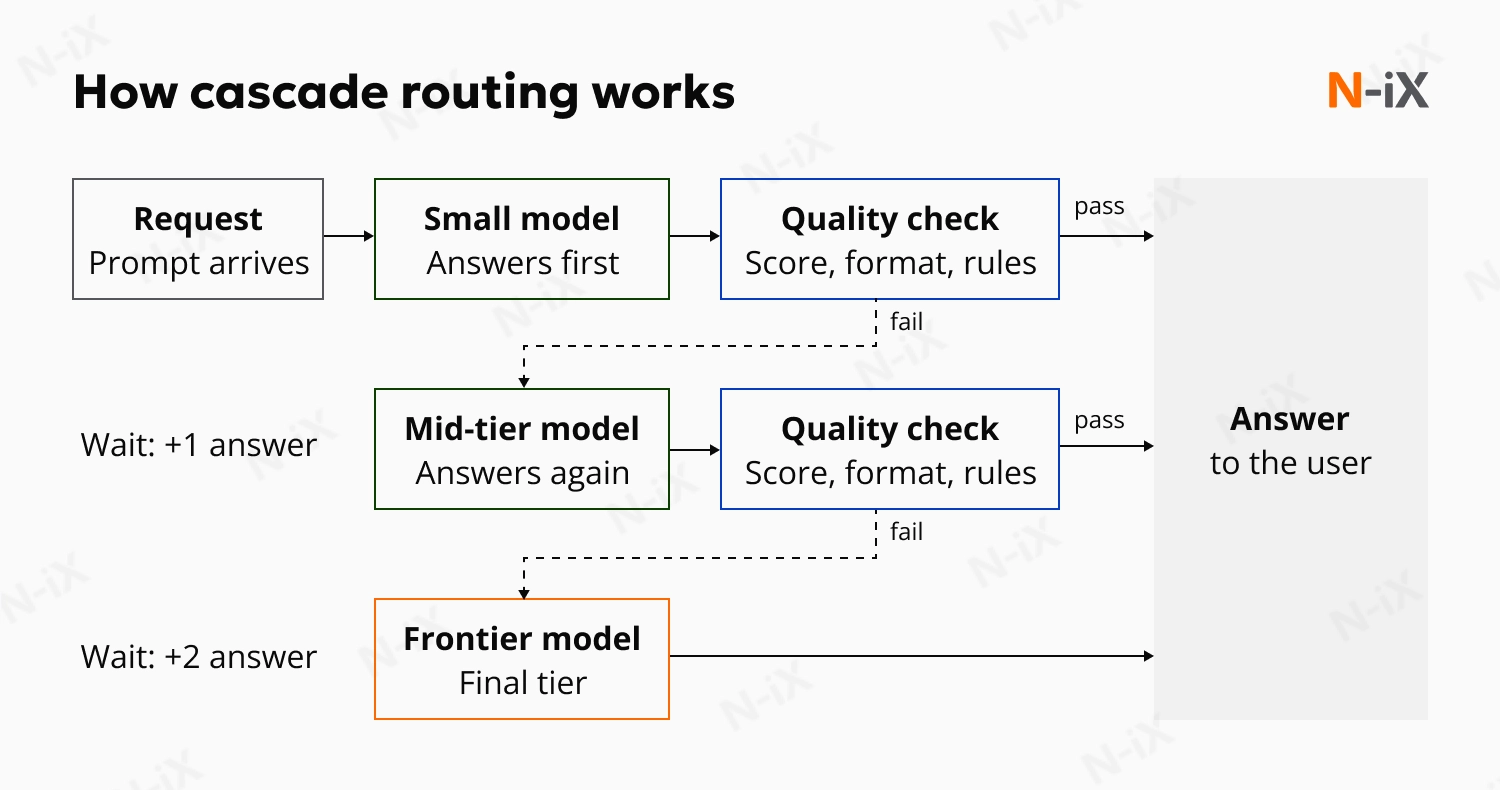
A cascade judges the real answer. The cheapest model responds first, and a check reviews the result: a confidence score, a format validator, or a policy rule. A weak answer moves to the next tier. Stanford’s FrugalGPT matched GPT-4's performance while cutting cost by up to 98%. The price of this accuracy is time. Every escalated request waits for two answers, which suits back-office tasks better than live chat.
A cascade also differs from a fallback. A fallback reacts to errors and timeouts. A cascade reacts to answer quality.
|
Type |
How it decides |
When it decides |
What it needs |
Typical use of model routing AI |
|
Rule-based |
Fixed rules on metadata |
Before generation |
Written rules |
Compliance, first version |
|
Semantic |
Similarity to example prompts |
Before generation |
A few examples per topic |
Assistants with many topics |
|
Classifier-based |
Predicted difficulty per prompt |
Before generation |
Training data, retraining after model changes |
High-volume, mixed workloads |
|
Cascade |
Quality check of the first answer |
After generation |
Tested quality checks |
Back-office and batch tasks |
AI model routing strategies for enterprises
The right routing setup depends on what a wrong answer costs in each workload. The higher that cost, the more checks the router needs before it trusts a cheaper model. The table maps common enterprise workloads to a routing setup and the metric to track.
|
Workload |
Recommended routing |
Main metric to track |
|
Customer support and internal assistants |
Semantic routing plus a classifier or cascade |
Cost per resolved request |
|
Document processing and data extraction |
Cascade with schema validation |
Share of documents processed without escalation |
|
Agentic workflows |
Routing per step, set by the orchestrator |
Cost per completed task |
|
RAG and knowledge search |
Routing by question type |
Answer accuracy |
|
Regulated data |
Policy rules first, then any other type |
Policy violations (target: zero) |
|
Cloud, on-premises, and edge AI |
Cascade from local models to the cloud |
Share of requests handled locally |
Routing for customer support and internal assistants
Most support requests are simple questions. A small share needs complex reasoning. A semantic layer sorts each request by topic: billing, orders, technical issues. Inside each topic, a classifier or cascade decides whether a small model can answer or the request needs a frontier model. Track cost per resolved request. A cheap answer that leads to a second ticket costs more than one good answer.
Routing for document processing and data extraction
Invoices, contracts, and forms produce structured output: fields, amounts, dates. An incorrect amount in an extracted invoice becomes a payment error, so every output passes validation. A program can check this output in milliseconds against a schema or business rules, making document processing a strong fit for cascade routing.
A small model extracts the data first. If the output passes validation, the job is done. If a field is missing or malformed, the document goes to a stronger model. Most of these jobs run in batches, where the extra wait on escalated documents goes unnoticed.
Routing for agentic workflows
In agent systems, routing happens inside the task. A supervisor agent splits a goal into short sub-tasks and hands each one to a sub-agent or model. A common pattern has three stages:
- A strong model plans the work;
- Cheaper models carry out the steps;
- A strong model reviews the result before it reaches the user.
A mistake early in a task can spread to every step after it, which is why the review stage matters. The execution steps carry most of the savings.
The orchestrator decides the next step, and the router decides which model performs it. This makes routing part of AI agent orchestration. A per-task token budget stops an agent from repeating the same step indefinitely.
Routing for RAG systems
In retrieval-augmented generation, the retrieved documents carry most of the answer. Many questions only need the model to restate or combine retrieved text, and a small model handles them well. Requests that compare several documents, calculate figures, or conclude go to a stronger model.
The better the retrieval, the more questions a small model can answer alone. For an enterprise software vendor, N-iX built a RAG assistant on Azure AI Foundry and Azure AI Search that made knowledge base search about 120 times faster.
Routing for regulated data
In banking, healthcare, and the public sector, the router becomes a control point. Policy rules run before any cost logic: requests with personal or regulated data go only to approved models in the required region, and every decision is logged for audit. Many enterprises still lack this layer: only 40% of large companies include model access management in their AI controls, according to KPMG’s Pulse survey.
Routing across cloud, on-premises, and edge
The model pool can span three environments. Cloud models handle complex reasoning and unpredictable volume. Open-weight AI models on your own infrastructure handle stable, high-volume tasks at a predictable monthly cost. Small models on edge devices handle real-time or offline tasks and keep data on the device. A cascade connects the tiers: the local model answers first, and complex cases go to the cloud.
Best practices for rolling out AI model routing
1. Instrument every LLM call and audit costs
Before writing any routing rule, log every model call with its prompt tokens, output tokens, latency, cost, and task type. This data shows where inference spend goes: which products, teams, and request types generate the most tokens. Score each use case on three factors: data sensitivity, request volume, and reasoning complexity. High-volume use cases with low sensitivity are the first candidates for routing. An AI readiness assessment covers this step together with data and governance checks.
2. Build an evaluation set from real requests
Collect a few hundred real requests per use case, with reference answers or a scoring rubric. Every decision for AI routing optimization later depends on this set. Run it automatically in the delivery pipeline. Every change to a routing rule then passes the same tests as a code change.
Every routing product promises savings from day one. None of them knows what a correct answer looks like in your claims process or your contract review. That definition has to come from your own teams and your own data. Once each request has a quality score, routing becomes an engineering decision that your CFO and your risk team can both approve.

3. Compare against the right baseline
Test three setups on the evaluation set: a frontier model for every request, the best single mid-tier model for every request, and the routed setup. Comparing against the frontier model alone makes almost any router look good. Routing is worth using only if it wins on cost per successful task against both single-model setups.
4. Centralize routing in the gateway and start with rules
Place routing logic in one gateway layer for all applications. It sits behind the gateway, or inside it if your gateway includes routing. Logic spread across individual services drifts apart, and every model change then needs code changes in several places. A central layer applies the same policies to every team and lets you add or replace models through configuration.
Start the AI model routing optimization with one high-volume, low-risk use case, two model tiers, and simple rules by task type, user tier, or data class. Rules cost almost nothing to run and produce clean logs from the first day. Define fallback chains from the start: on a timeout, a failed format check, or a low-confidence answer, the request moves to a backup model.
5. Test in shadow mode
Run the new router in parallel with production without serving its answers, and compare its choices with the evaluation results. Then send a small share of live traffic through it and widen the share step by step.
6. Move to learned routing
Once production logs and the evaluation set are in place, train a classifier or tune a cascade. Compare the learned router against the rule-based version on the same metrics. Keep the rules for policy and data control: the learned layer handles difficulty, and the rules control compliance.
7. Monitor quality next to cost
Track four metrics every week:
- Cost per successful task: total spend divided by tasks completed correctly.
- Escalation rate: the share of requests that move to a stronger model.
- Quality change: routed answers compared with the baseline on the evaluation set.
- Fallback rate: the share of requests that hit a backup model after an error.
Log the exact model behind every answer, with its cost and latency. These logs explain quality drops, prove data residency for auditors, and feed FinOps for AI reporting. The router then becomes part of your LLMOps practice, next to model versioning, deployment, and monitoring.
Review the model-to-tier mapping and provider prices every quarter, and re-run the evaluation set after every change in the model pool. Rules tuned for last quarter’s models lose savings without any visible error. For internal assistants, show users which model answered and allow a manual override for sensitive tasks.
Plan your AI model routing with N-iX
A cheaper model saves money only while its answers stay correct. Data rules limit which models a request may reach, and providers change models and prices every few months. Each of these questions needs data from your own traffic. A default router configuration gives you none of that data.
N-iX treats routing as a model-neutral engineering task. Our teams work with models from all major providers and with open-weight models, and every recommendation follows your evaluation results alone. A routing engagement brings together ML engineers who build the evaluation set and the routing logic, platform engineers who run the gateway, and FinOps specialists who tie token spend to products and teams. After launch, the same team reviews the model pool every quarter and adjusts the rules after prices or models change.
A routing assessment with our AI consulting team turns your current AI spend into a clear plan:
- Cost baseline for each AI use case;
- Requests that can move to cheaper models with no loss in quality;
- Evaluation set built from your real traffic;
- Recommended routing setup and the metrics to track it.
FAQ
What is an AI router?
An AI router, or AI model router, is a decision layer between an application and a pool of large language models. In LLM applications, it reads each request and sends it to the model that can answer it well at the lowest cost: small models for routine tasks, frontier models for complex reasoning. The user sees one assistant, and the router chooses the model behind each answer.
What are the benefits of model routing in AI systems?
The main benefit of model routing solutions for AI apps is a lower cost per request because routine work moves from frontier models to cheaper ones. Simple requests also get faster answers, a fallback model keeps the service running during provider outages, and one control point enforces data rules across all AI traffic. Teams can also add or replace models through configuration, with no changes to application code.
How do you optimize LLM costs with AI model routing?
Send routine requests to small models, keep frontier models for complex reasoning, and route each agent step separately. Batch non-urgent jobs, keep conversations on one model to protect cache discounts, and track cost per successful task. A partner with hands-on routing experience, such as the N-iX AI team, can set up this measurement and routing logic on your own traffic from the start.
What's the ROI of AI model routing?
The return equals the savings on model spend minus the cost of running the router, the evaluation set, and monitoring. The RouteLLM router from UC Berkeley and LMSYS cut costs by over 85% on the MT Bench test at 95% of GPT-4’s quality. In production, ROI is highest for high-volume workloads with mixed task difficulty, and N-iX measures it per use case against the best single-model setup before any rollout.
Why use an AI model router to reduce API costs?
Model providers charge per token, and the price gap between their smallest and largest models is large, yet most requests need only a small model. A router applies the lower price to each request it can. It also lets you move traffic to new, lower-priced models after providers change their prices.
Have a question?
Speak to an expert